Self-Hosting
Run the full Molecule AI stack on your own infrastructure.
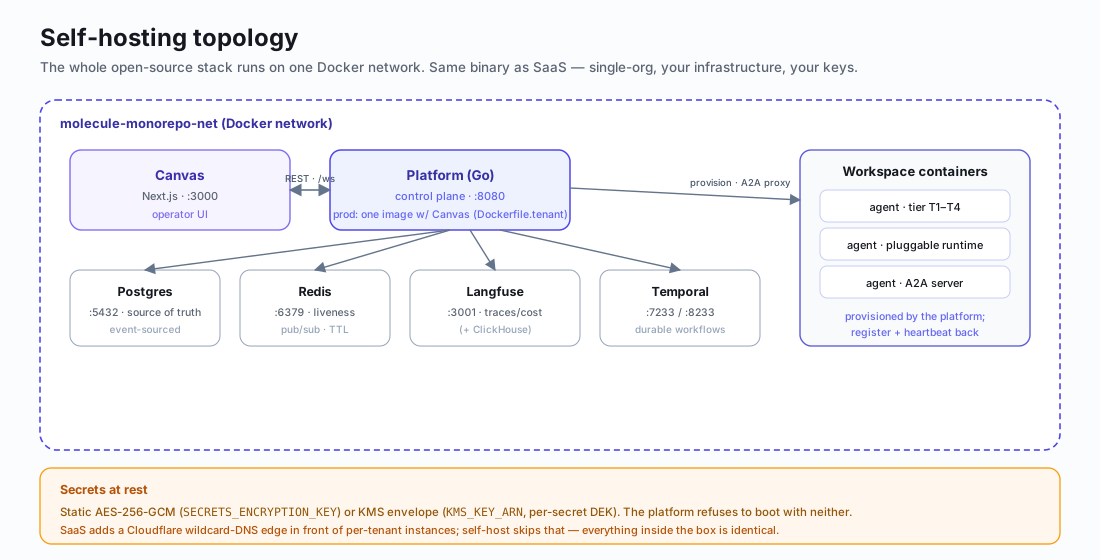
Molecule AI is open source and runs entirely on your own infrastructure — the same binary as the hosted SaaS, in single-org mode. The whole stack sits on one Docker network:
Prerequisites
| Requirement | Minimum Version |
|---|---|
| Docker Desktop | Latest stable |
| Go | 1.25+ |
| Node.js | 20+ |
| Git | 2.x |
Quick Start
The fastest way to get Molecule AI running locally:
git clone https://git.moleculesai.app/molecule-ai/molecule-core.git
cd molecule-core
./scripts/dev-start.sh
# Canvas: http://localhost:3000
# Platform: http://localhost:8080
This script starts all infrastructure services, builds the platform, and launches the canvas dev server.
Infrastructure Setup
Molecule AI depends on four infrastructure services, all managed via docker-compose.infra.yml and attached to the shared molecule-monorepo-net Docker network:
| Service | Port | Purpose |
|---|---|---|
| Postgres | 5432 | Primary datastore (also backs Langfuse and Temporal) |
| Redis | 6379 | Pub/sub, heartbeat TTLs |
| Langfuse | 3001 | LLM trace viewer (backed by ClickHouse) |
| Temporal | 7233 (gRPC), 8233 (Web UI) | Durable workflow engine |
Start infrastructure only:
./infra/scripts/setup.shTear everything down (removes volumes):
./infra/scripts/nuke.shManual Setup
If you prefer to start each component individually:
Platform (Go)
cd platform
go build ./cmd/server
go run ./cmd/server
# Requires Postgres + Redis running
The platform must be run from the platform/ directory, not the repo root.
Canvas (Next.js)
cd canvas
npm install
npm run dev
# Dev server on http://localhost:3000
Docker Compose
For infrastructure only:
docker compose -f docker-compose.infra.yml up -dFor the full stack (infrastructure + platform + canvas):
docker compose upEnvironment Variables
Platform
| Variable | Default | Description |
|---|---|---|
DATABASE_URL | -- | Postgres connection string (required) |
REDIS_URL | -- | Redis connection string (required) |
PORT | 8080 | Platform HTTP port |
PLATFORM_URL | http://host.docker.internal:PORT | URL passed to agent containers to reach the platform |
CORS_ORIGINS | http://localhost:3000,http://localhost:3001 | Comma-separated allowed origins |
SECRETS_ENCRYPTION_KEY | -- | AES-256 key (32 bytes) for encrypting workspace secrets |
WORKSPACE_DIR | -- | Global fallback host path for /workspace bind-mount |
MOLECULE_ENV | -- | Set to production to hide E2E helper endpoints |
ACTIVITY_RETENTION_DAYS | 7 | How long activity logs are retained |
ACTIVITY_CLEANUP_INTERVAL_HOURS | 6 | How often the cleanup job runs |
RATE_LIMIT | 600 | Requests per minute per client |
Tier Resource Limits
Override per-tier memory and CPU caps for workspace containers. CPU_SHARES follows Docker's convention where 1024 equals 1 CPU.
| Variable | Default | Description |
|---|---|---|
TIER2_MEMORY_MB | 512 | Standard tier memory limit |
TIER2_CPU_SHARES | 1024 | Standard tier CPU shares |
TIER3_MEMORY_MB | 2048 | Privileged tier memory limit |
TIER3_CPU_SHARES | 2048 | Privileged tier CPU shares |
TIER4_MEMORY_MB | 4096 | Full-host tier memory limit |
TIER4_CPU_SHARES | 4096 | Full-host tier CPU shares |
Plugin Install Safeguards
| Variable | Default | Description |
|---|---|---|
PLUGIN_INSTALL_BODY_MAX_BYTES | 65536 | Max request body size (64 KiB) |
PLUGIN_INSTALL_FETCH_TIMEOUT | 5m | Whole fetch and copy deadline |
PLUGIN_INSTALL_MAX_DIR_BYTES | 104857600 | Max staged-tree size (100 MiB) |
Canvas
| Variable | Default | Description |
|---|---|---|
NEXT_PUBLIC_PLATFORM_URL | http://localhost:8080 | Platform API URL |
NEXT_PUBLIC_WS_URL | ws://localhost:8080/ws | WebSocket endpoint |
Tenant Mode
| Variable | Default | Description |
|---|---|---|
CANVAS_PROXY_URL | -- | When set, the Go server proxies canvas requests to this URL |
MOLECULE_ORG_ID | -- | UUID for multi-tenant isolation; leave unset for self-hosted |
Production Deployment
For production, use platform/Dockerfile.tenant which builds a combined Go + Canvas image:
docker build -f platform/Dockerfile.tenant -t molecule-platform .This image serves both the API and the canvas frontend from a single container.
Security Configuration
Secrets Encryption
Set SECRETS_ENCRYPTION_KEY to a 32-byte AES-256 key to encrypt workspace secrets at rest. Without this variable, secrets are stored in plaintext.
# Generate a key
openssl rand -hex 32
Warning: SECRETS_ENCRYPTION_KEY cannot be rotated without a data migration. Choose carefully before deploying to production.
Rate Limiting
The RATE_LIMIT variable (default 600 requests/min) applies per client. Adjust based on your expected traffic.
CORS
Set CORS_ORIGINS to a comma-separated list of allowed origins. In production, restrict this to your actual domain.
Admin Authentication
All /admin/* endpoints require ADMIN_TOKEN. See
ADMIN_TOKEN — Production Requirement for
setup, generation, and fail-open risk details.
Action required by April 22, 2026: Set ADMIN_TOKEN in all production
deployments before this date.
Pre-commit Hook
Install the project's pre-commit hooks to enforce code quality:
git config core.hooksPath .githooksThe hook enforces:
'use client'directive on hook-using.tsxfiles- Dark theme only (no
whiteorlightCSS classes) - No SQL injection patterns (
fmt.Sprintfwith SQL) - No leaked secrets (
sk-ant-,ghp_,AKIA)
Commits are rejected until all violations are fixed.
Building Workspace Images
Build the base workspace image for local development:
bash workspace-template/build-all.shAdapter-specific images are built from standalone template repos. Each repo's Dockerfile installs molecule-ai-workspace-runtime from PyPI plus adapter-specific dependencies.