Channels
Connect workspaces to Telegram, Slack, Discord, and Lark/Feishu for social integrations.
Overview
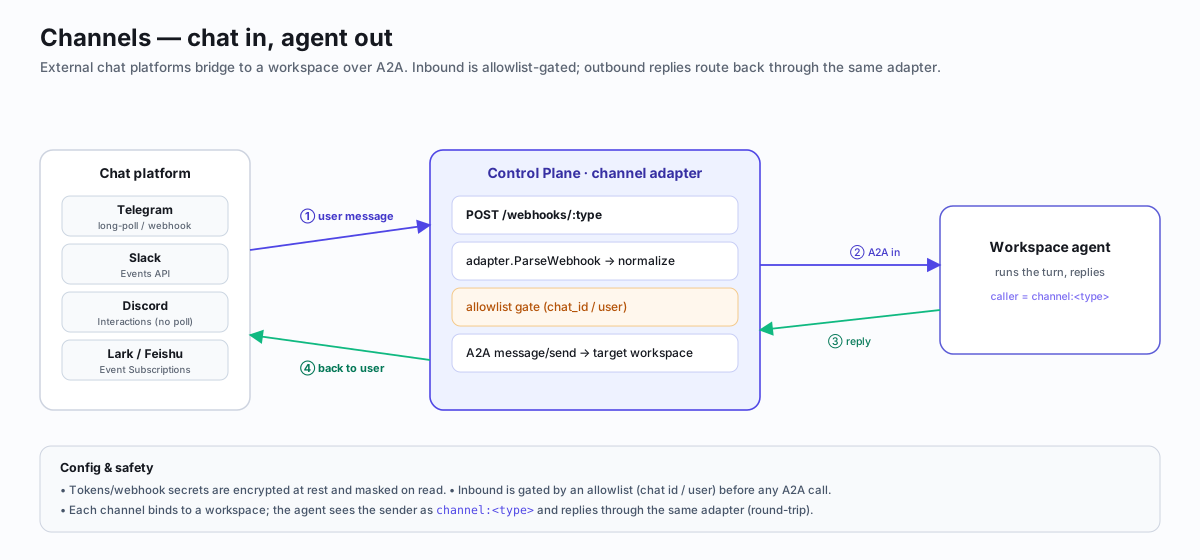
Channels let workspaces send and receive messages on social platforms. Each workspace can have multiple channel integrations — a Telegram bot, a Slack webhook, a Discord webhook, a Lark/Feishu Custom Bot — configured independently with per-channel allowlists and JSONB config.
Outbound messages flow from the workspace through the platform adapter to the
social platform. Inbound messages arrive via webhooks (POST /webhooks/:type),
are parsed by the adapter, and forwarded to the workspace as A2A
message/send requests.
User (Telegram/Slack/Discord/Lark) ──webhook──> Platform ──A2A──> Workspace Agent
                                                     <──adapter──  (response)
User <──bot message────────────────────────────────────────────────/
Adapters
Four adapters are registered out of the box. Use GET /channels/adapters to
list them at runtime.
Telegram
Uses the Telegram Bot API. Supports both long-polling (for inbound) and direct
API calls (for outbound). The adapter caches BotAPI instances to avoid
repeated getMe calls.
Required config fields:
| Field | Type | Description |
|---|---|---|
bot_token | string | Telegram bot token (123456789:ABCdef...). Validated against a strict regex. |
chat_id | string | Comma-separated chat IDs to listen on and send to. |
Features:
- Long-polling with 30s timeout and 2s retry interval
- Auto-reply to
/startwith the chat ID (useful for setup) - Bot commands:
/start,/help,/reset(clear history),/cancel(best-effort) - Long messages automatically split at paragraph/line/word boundaries (4096 char limit)
- Typing indicator sent while the agent processes
- Rate-limit handling with
retry_afterbackoff - Auto-discovers chats via
getUpdates(includingmy_chat_memberevents for group adds) - Auto-disables the channel when the bot is kicked from a chat
Slack
Supports two outbound modes — Bot Token (recommended) and Incoming Webhook (legacy). Inbound uses the Slack Events API in both modes.
Config fields:
| Field | Type | Required | Description |
|---|---|---|---|
bot_token | string | One of bot_token / webhook_url | Slack Bot User OAuth Token (xoxb-…). Enables per-agent display name and icon via chat:write.customize. |
webhook_url | string | One of bot_token / webhook_url | Incoming Webhook URL (must start with https://hooks.slack.com/). Used as fallback when bot_token is absent. |
channel | string | Required with bot_token | Target channel ID or name (e.g. C01234ABCDE or #general). |
username | string | Optional | Display name override shown in Slack (Bot Token mode only). |
icon_emoji | string | Optional | Emoji icon for the agent's avatar (e.g. :robot_face:). Bot Token mode only. |
Features:
- Bot Token mode — per-agent identity: each workspace can post with its own
name and icon using
chat.postMessage+chat:write.customize. Markdown is automatically converted to Slackmrkdwnformat. - Webhook mode — simple outbound-only integration, no OAuth required.
- Inbound via Events API JSON payload or slash command (URL-encoded form).
url_verificationchallenge handshake supported.- Slash commands prepend the command name so the agent sees the full invocation.
Required Slack app scopes (Bot Token mode):
chat:write, chat:write.customize, channels:history, app_mentions:read
Discord
Uses Discord Incoming Webhooks for outbound and Discord Interactions (slash commands) for inbound. Discord uses a push-based interactions model — there is no long-polling; the platform receives signed payloads at the interactions endpoint.
Required config fields:
| Field | Type | Description |
|---|---|---|
webhook_url | string | Discord Incoming Webhook URL. Must start with https://discord.com/api/webhooks/. Validated on creation (matches the Slack SSRF-guard pattern). |
Global secret:
# Register the webhook URL as a global or per-workspace secret
curl -X PUT http://localhost:8080/settings/secrets \
  -H 'Content-Type: application/json' \
  -d '{"key":"DISCORD_WEBHOOK_URL","value":"https://discord.com/api/webhooks/..."}'
Features:
- Outbound via Incoming Webhook — POSTs
{"content": "<text>"}to the webhook URL - Long messages automatically split at newline/space boundaries (Discord 2000-character hard limit)
- Inbound via Discord Interactions — no long-polling; Discord pushes signed payloads
- Type 1 PING — router layer responds
{"type":1}; adapter returnsnil(no A2A forward) - Type 2 APPLICATION_COMMAND — slash command, forwarded as
/commandname option1 option2 - Type 3 MESSAGE_COMPONENT — button/select interaction, forwarded as component data
- Type 1 PING — router layer responds
- User identity prefers
member.user(guild) overuser(DM) for consistent routing StartPollingis a no-op (returns nil) — Discord uses interactions, not polling
Setup:
- Incoming Webhook — Discord Server → channel settings → Integrations → Webhooks → New Webhook → Copy Webhook URL
- Add as a secret:
PUT /settings/secretswithDISCORD_WEBHOOK_URL - Slash commands (inbound) — create a Discord Application at discord.com/developers, set the Interactions Endpoint URL to
https://<platform-host>/webhooks/discord - Verify the endpoint: Discord sends a type-1 PING; the platform responds
{"type":1}automatically
Example config:
{
  "type": "discord",
  "config": {
    "webhook_url": "https://discord.com/api/webhooks/1234567890/abcdef..."
  }
}
Discord does not support bot-initiated long-polling. Inbound messages only work via slash commands registered in your Discord Application. If you only need outbound (workspace → Discord), no Application setup is required — just add the webhook URL.
Lark / Feishu
Outbound via Custom Bot webhooks, inbound via Event Subscriptions.
Required config fields:
| Field | Type | Description |
|---|---|---|
webhook_url | string | Custom Bot webhook URL. Must start with https://open.feishu.cn/open-apis/bot/v2/hook/ or https://open.larksuite.com/open-apis/bot/v2/hook/. |
Optional config fields:
| Field | Type | Description |
|---|---|---|
verify_token | string | Verification Token from the app's Event Subscriptions page. When set, inbound events with a mismatching token are rejected. |
Features:
- Both China (
open.feishu.cn) and international (open.larksuite.com) endpoints supported url_verificationhandshake with constant-timeverify_tokencomparison- v2 event payload parsing (
im.message.receive_v1) - Token verification on both
url_verificationandevent_callbackpayloads - Application-level error codes checked (Lark returns HTTP 200 even for app errors)
Setup Flow
1. Create a Channel
curl -X POST http://localhost:8080/workspaces/{id}/channels \
  -H "Content-Type: application/json" \
  -H "Authorization: Bearer {token}" \
  -d '{
    "type": "telegram",
    "config": {
      "bot_token": "123456789:ABCdefGHIjklmnopQRSTuvwxyz",
      "chat_id": "-1001234567890"
    }
  }'
2. Test the Connection
curl -X POST http://localhost:8080/workspaces/{id}/channels/{channelId}/test \
  -H "Authorization: Bearer {token}"
3. Send a Message
curl -X POST http://localhost:8080/workspaces/{id}/channels/{channelId}/send \
  -H "Content-Type: application/json" \
  -H "Authorization: Bearer {token}" \
  -d '{"text": "Hello from the agent!"}'
Inbound Webhooks
Register your platform's public URL as the webhook endpoint for each social platform. Inbound messages arrive at:
POST /webhooks/:typewhere :type is telegram, slack, discord, or lark. The platform:
- Looks up all channels of that type
- Calls the adapter's
ParseWebhookto extract a standardizedInboundMessage - Checks the allowlist (if configured)
- Forwards the message to the workspace via A2A
message/send
For Telegram, the platform can also use long-polling instead of webhooks, started automatically when a Telegram channel is created.
For Discord, the platform automatically handles type-1 PING interactions (required by Discord for endpoint verification) and forwards type-2 and type-3 interaction payloads to the workspace.
Discover Chats
Auto-detect available chats for a bot token before creating a channel:
curl -X POST http://localhost:8080/channels/discover \
  -H "Content-Type: application/json" \
  -d '{"type": "telegram", "bot_token": "123456789:ABCdef..."}'
Returns the bot username, discovered chats (with IDs, names, and types), and whether the bot can read all group messages (Telegram privacy mode).
Allowlists
Each channel row has an allowed_users JSONB array. When non-empty, only
messages from users whose IDs appear in the list are forwarded to the workspace.
All others are silently dropped.
Config Encryption
Sensitive config fields (like bot_token) are encrypted at rest. The List
endpoint decrypts them server-side and masks tokens in the response
(showing only the first 4 and last 4 characters).
API Reference
| Method | Path | Description |
|---|---|---|
| GET | /channels/adapters | List available adapter types |
| POST | /channels/discover | Auto-detect chats for a bot token |
| GET | /workspaces/:id/channels | List channels for a workspace |
| POST | /workspaces/:id/channels | Add a channel |
| PATCH | /workspaces/:id/channels/:channelId | Update a channel |
| DELETE | /workspaces/:id/channels/:channelId | Remove a channel |
| POST | /workspaces/:id/channels/:channelId/test | Test connection |
| POST | /workspaces/:id/channels/:channelId/send | Send outbound message |
| POST | /webhooks/:type | Incoming social webhook |
Example Configs
Telegram
{
  "type": "telegram",
  "config": {
    "bot_token": "123456789:ABCdefGHIjklmnopQRSTuvwxyz_1234",
    "chat_id": "-1001234567890"
  }
}
Multiple chats (comma-separated):
{
  "type": "telegram",
  "config": {
    "bot_token": "123456789:ABCdefGHIjklmnopQRSTuvwxyz_1234",
    "chat_id": "-1001234567890, -1009876543210"
  }
}
Slack
{
  "type": "slack",
  "config": {
    "webhook_url": "https://hooks.slack.com/services/YOUR/WEBHOOK/URL"
  }
}
Discord
{
  "type": "discord",
  "config": {
    "webhook_url": "https://discord.com/api/webhooks/1234567890123456789/abcdefGHIjklmnopQRSTuvwxyz_1234"
  }
}
Lark / Feishu
{
  "type": "lark",
  "config": {
    "webhook_url": "https://open.larksuite.com/open-apis/bot/v2/hook/xxxxxxxx-xxxx-xxxx-xxxx-xxxxxxxxxxxx",
    "verify_token": "your-verification-token"
  }
}
China endpoint:
{
  "type": "lark",
  "config": {
    "webhook_url": "https://open.feishu.cn/open-apis/bot/v2/hook/xxxxxxxx-xxxx-xxxx-xxxx-xxxxxxxxxxxx"
  }
}