Schedules
Run recurring prompts on cron schedules — automated audits, reports, and maintenance.
Overview
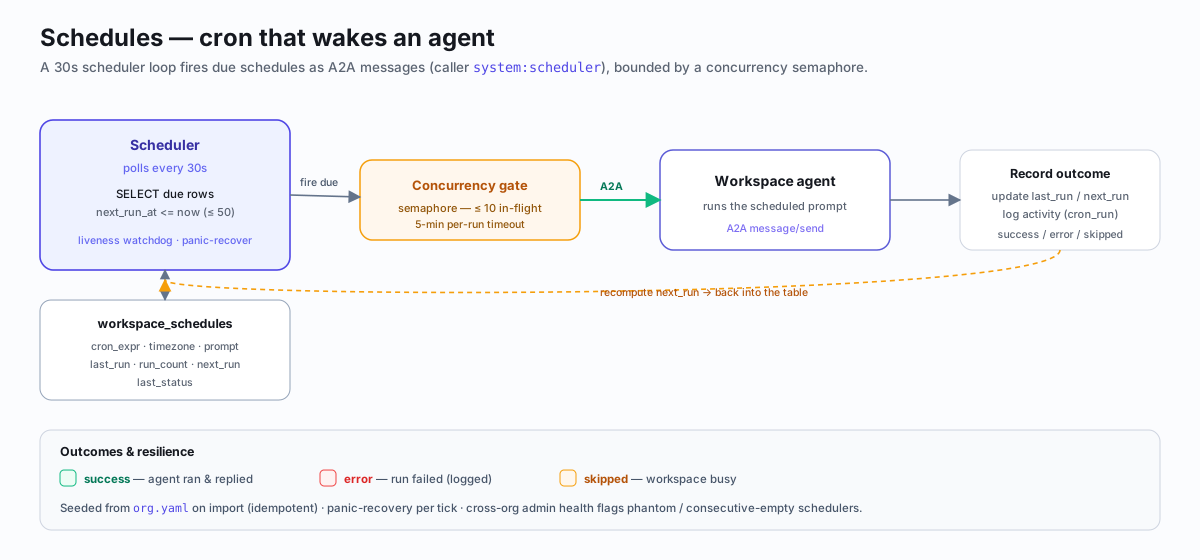
Schedules let you run recurring prompts against a workspace on a cron schedule.
Each tick fires an A2A message/send into the workspace, so the agent
processes the prompt as if it received a normal message. This enables automated
audits, daily reports, weekly retrospectives, and any other recurring task.
The scheduler polls the workspace_schedules table every 30 seconds. When a
schedule's next_run_at has passed, the scheduler fires the prompt and
computes the next run time.
Scheduler (30s poll) ──> workspace_schedules table
                              │
                  next_run_at <= now?
                              │
                    ┌─────────┴──────────┐
                    │  A2A message/send   │──> Workspace Agent
                    │  (callerID=system:  │
                    │   scheduler)        │
                    └─────────────────────┘
Creating a Schedule
curl -X POST http://localhost:8080/workspaces/{id}/schedules \
  -H "Content-Type: application/json" \
  -H "Authorization: Bearer {token}" \
  -d '{
    "name": "Daily Security Audit",
    "cron_expr": "0 9 * * *",
    "timezone": "America/New_York",
    "prompt": "Run a security audit of all open PRs. Check for leaked secrets, SQL injection, and auth bypass.",
    "enabled": true
  }'
Required fields:
| Field | Type | Description |
|---|---|---|
cron_expr | string | Standard cron expression (5-field: minute, hour, day-of-month, month, day-of-week) |
prompt | string | The text sent to the workspace as an A2A message each tick |
Optional fields:
| Field | Type | Default | Description |
|---|---|---|---|
name | string | "" | Human-readable label |
timezone | string | "UTC" | IANA timezone for cron evaluation (e.g. America/New_York, Asia/Tokyo) |
enabled | bool | true | Whether the schedule fires |
The timezone is validated against Go's time.LoadLocation on create and update.
The cron expression is validated and the next run time is computed immediately.
CRUD Operations
| Method | Path | Description |
|---|---|---|
| GET | /workspaces/:id/schedules | List all schedules for a workspace |
| POST | /workspaces/:id/schedules | Create a new schedule |
| PATCH | /workspaces/:id/schedules/:scheduleId | Update a schedule (partial update via COALESCE) |
| DELETE | /workspaces/:id/schedules/:scheduleId | Delete a schedule |
Update
PATCH accepts any subset of fields. Only provided fields are changed — the
handler uses COALESCE in SQL so omitted fields retain their current values.
If cron_expr or timezone changes, the next run time is recomputed.
curl -X PATCH http://localhost:8080/workspaces/{id}/schedules/{scheduleId} \
  -H "Content-Type: application/json" \
  -H "Authorization: Bearer {token}" \
  -d '{"enabled": false}'
Delete
curl -X DELETE http://localhost:8080/workspaces/{id}/schedules/{scheduleId} \
  -H "Authorization: Bearer {token}"
All schedule operations are scoped to the owning workspace ID to prevent IDOR.
Manual Trigger
Fire a schedule immediately, outside its cron cadence:
curl -X POST http://localhost:8080/workspaces/{id}/schedules/{scheduleId}/run \
  -H "Authorization: Bearer {token}"
Returns the schedule's prompt so the frontend can POST it to
/workspaces/:id/a2a. This keeps the handler stateless.
Run History
View the last 20 runs for a schedule, including error details for failed runs:
curl http://localhost:8080/workspaces/{id}/schedules/{scheduleId}/history \
  -H "Authorization: Bearer {token}"
Response:
[
  {
    "timestamp": "2026-04-16T09:00:02Z",
    "duration_ms": 4523,
    "status": "success",
    "error_detail": "",
    "request": {"schedule_id": "...", "prompt": "..."}
  },
  {
    "timestamp": "2026-04-15T09:00:01Z",
    "duration_ms": null,
    "status": "error",
    "error_detail": "A2A proxy returned 503: workspace container not running",
    "request": {"schedule_id": "...", "prompt": "..."}
  }
]
History is pulled from the activity_logs table filtered by
activity_type = 'cron_run' and the schedule ID in the request body.
Source Field
Each schedule has a source field that tracks how it was created:
| Value | Meaning |
|---|---|
template | Seeded by an org template import or bundle import. On re-import, only template-source rows are refreshed — runtime rows survive. |
runtime | Created via the Canvas UI or API. These are user-owned and never overwritten by re-imports. |
Status Values
The last_status field on a schedule tracks the outcome of the most recent
run:
| Status | Meaning |
|---|---|
success | The A2A message was delivered and the workspace acknowledged it. |
error | The A2A proxy returned a non-2xx status. last_error contains details. |
skipped | The workspace was busy (concurrency-aware skip). The scheduler detected active_tasks > 0 and deferred the run to avoid overloading the agent. |
Schedule Health Endpoint
Peer workspaces can monitor each other's schedule health without admin auth:
curl http://localhost:8080/workspaces/{id}/schedules/health \
  -H "X-Workspace-ID: {callerWorkspaceId}" \
  -H "Authorization: Bearer {callerToken}"
This endpoint returns execution-state fields only (last_run_at,
last_status, run_count, next_run_at, last_error). It deliberately
omits prompt and cron_expr so sensitive task content is never exposed to
peer workspaces.
Auth rules (mirrors the A2A proxy pattern):
X-Workspace-IDheader required to identify the caller- Caller's own bearer token validated (legacy workspaces grandfathered)
registry.CanCommunicate(callerID, workspaceID)must return true- System callers (
system:*,webhook:*,test:*) bypass checks - Self-calls always allowed
Cross-Org Schedule Health (Admin)
Operators can retrieve schedule health for every workspace in the org in a single call:
curl http://localhost:8080/admin/schedules/health \
  -H "Authorization: Bearer <admin-token>"
Requires AdminAuth. Returns an array covering every schedule across every workspace:
[
  {
    "schedule_id":        "uuid",
    "workspace_id":       "uuid",
    "workspace_name":     "security-auditor",
    "expression":         "0 */6 * * *",
    "enabled":            true,
    "last_fired_at":      "2026-04-18T12:00:00Z",
    "next_scheduled_at":  "2026-04-18T18:00:00Z",
    "consecutive_empty":  0,
    "phantom_detected":   false
  }
]| Field | Description |
|---|---|
last_fired_at | Timestamp of the most recent run attempt (null if never fired) |
next_scheduled_at | When the scheduler will next attempt this schedule |
consecutive_empty | Count of consecutive runs that fired but received no task completion — an early indicator of a stuck or unresponsive workspace |
phantom_detected | true if the schedule appears in the DB but its workspace has been removed; these are safe to delete |
Use this endpoint to audit cron health org-wide before a maintenance window, or to identify schedules that haven't fired when expected.
Scheduler Internals
Poll Loop
The scheduler runs a 30-second poll loop. Each tick:
- Queries up to 50 due schedules (
next_run_at <= now AND enabled = true) - Fires up to 10 concurrently via a semaphore
- Each fire sends an A2A
message/sendwith a 5-minute timeout - Updates
last_run_at,run_count,last_status, andnext_run_at - Logs the run to
activity_logswithactivity_type = 'cron_run'
Panic Recovery
The scheduler recovers from panics inside the tick function. A single bad row, malformed cron expression, or database blip cannot permanently kill the scheduler. Without this recovery, the goroutine dies silently and the only signal is "no crons firing."
Liveness Watchdog
The scheduler reports heartbeats to the supervised subsystem. The
/admin/liveness endpoint exposes per-subsystem ages, so operators can detect
a stuck scheduler before it causes a missed-cron outage.
Scheduler.Healthy() returns true if the scheduler has completed a tick within
the last 60 seconds (2x the poll interval). Returns false before the first tick
or if the scheduler is stalled.
Examples
Hourly Security Audit
{
  "name": "Hourly Security Scan",
  "cron_expr": "0 * * * *",
  "timezone": "UTC",
  "prompt": "Scan all open PRs for leaked secrets, SQL injection patterns, and auth bypass vulnerabilities. Report findings as a summary."
}
Daily Standup Report
{
  "name": "Daily Standup",
  "cron_expr": "0 9 * * 1-5",
  "timezone": "America/Los_Angeles",
  "prompt": "Generate a standup report: what was completed yesterday, what is planned today, and any blockers. Post to the team channel."
}
Weekly Retrospective
{
  "name": "Weekly Retro",
  "cron_expr": "0 17 * * 5",
  "timezone": "America/New_York",
  "prompt": "Write a weekly retrospective covering PRs merged, issues closed, cron failures, and code review findings. Post as a GitHub issue."
}
Nightly Cleanup
{
  "name": "Nightly Cleanup",
  "cron_expr": "0 2 * * *",
  "timezone": "UTC",
  "prompt": "Archive stale branches older than 30 days. Close issues that have been inactive for 60 days with a comment explaining the auto-close policy.",
  "enabled": true
}
Timezone Handling
All cron expressions are evaluated in the specified timezone. If no timezone is
provided, UTC is used. The timezone must be a valid IANA timezone string
(e.g. America/New_York, Europe/London, Asia/Tokyo).
When a schedule's cron_expr or timezone is updated, the next_run_at is
immediately recomputed using the new values. This prevents schedules from
firing at unexpected times after a timezone change.
API Reference
| Method | Path | Description |
|---|---|---|
| GET | /workspaces/:id/schedules | List schedules |
| POST | /workspaces/:id/schedules | Create schedule |
| PATCH | /workspaces/:id/schedules/:scheduleId | Update schedule |
| DELETE | /workspaces/:id/schedules/:scheduleId | Delete schedule |
| POST | /workspaces/:id/schedules/:scheduleId/run | Manual trigger |
| GET | /workspaces/:id/schedules/:scheduleId/history | Run history (last 20) |
| GET | /workspaces/:id/schedules/health | Health view (open to peers) |