Google ADK Runtime
Run Molecule AI workspaces on Google's Agent Development Kit (ADK) — Gemini-native agents with sequential, parallel, and loop workflows.
Google ADK Runtime
The google-adk runtime adapter integrates Google's Agent Development Kit (v1.0+, Apache-2.0) into Molecule AI workspaces. ADK is Google's production-grade Python framework for building AI agents backed by Gemini models, with built-in support for sequential, parallel, and loop execution patterns.
Google ADK adapter was added in PR #550 (issue #542). It passes 46/46 tests with 100% coverage.
Architecture
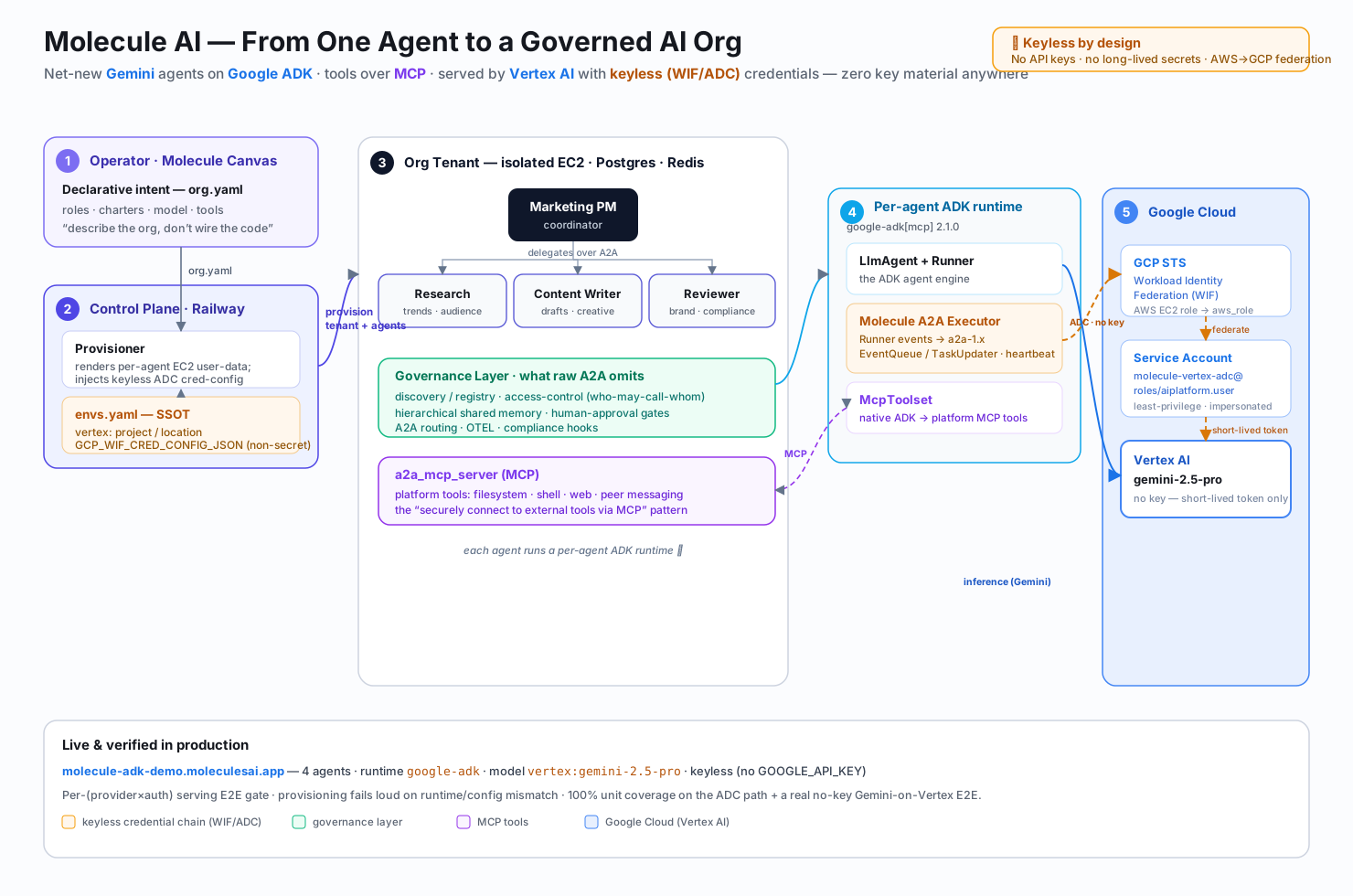
A google-adk workspace runs Google's ADK engine (LlmAgent + Runner + McpToolset); a Molecule-authored A2A executor bridges ADK Runner events into the platform's a2a-1.x event model, so the agent is a fully governed citizen of the org. Platform tools reach the agent over MCP, and Gemini is served by Vertex AI using keyless credentials (Application Default Credentials over Workload Identity Federation — no API key on disk).
When to use Google ADK vs other runtimes
| Google ADK | LangGraph | AutoGen | |
|---|---|---|---|
| Best for | Gemini-native agents, Google Cloud integrations | Complex stateful graphs, fine-grained flow control | Multi-agent dialogue and code-execution workflows |
| Model family | Gemini (gemini-2.0-flash, gemini-1.5-pro, …) | Any LangChain-supported model | Any AutoGen-supported model |
| Execution model | Sequential / Parallel / Loop built-in | Explicit graph with nodes and edges | Conversation-driven, agents negotiate through dialogue |
| Tool support | Google-native + LangChain tools | LangChain tools | Python functions, code execution |
| State persistence | ADK SessionService | LangGraph checkpointer | In-process conversation history |
| Google Cloud fit | First-class | Via LangChain integrations | Via plugin |
Choose Google ADK when:
- Your workload is Google Cloud–native (Vertex AI, Cloud Tools, Google Workspace)
- You want Gemini models with minimal adapter overhead
- You prefer ADK's opinionated sequential/parallel/loop composition over explicit graph edges
- You're building agents that call Google APIs (Maps, Search, Drive, etc.)
Installation
Each Molecule AI workspace template is a standalone Docker image. The Google ADK workspace template (molecule-ai-workspace-template-google-adk) ships with the adapter pre-configured. To use it, set the runtime in your workspace config.yaml:
runtime: google-adk
model: google:gemini-2.0-flash
If you are building a custom image on top of molecule-ai-workspace-runtime, add the adapter dependency to your requirements.txt:
molecule-ai-workspace-runtime>=0.1.0
google-adk>=1.0.0
Install manually with pip:
pip install google-adkGoogle ADK requires Python 3.10+. Ensure your workspace Dockerfile uses python:3.11-slim or newer.
Secrets
The adapter reads your Google credentials from workspace secrets. Set these before starting a Google ADK workspace:
| Secret key | Required | Purpose |
|---|---|---|
GOOGLE_API_KEY | Yes (unless using Vertex AI) | Gemini API key from Google AI Studio |
GOOGLE_CLOUD_PROJECT | Vertex AI only | GCP project ID |
GOOGLE_CLOUD_LOCATION | Vertex AI only | Region (e.g. us-central1) |
GOOGLE_GENAI_USE_VERTEXAI | Vertex AI only | Set to true to route via Vertex AI instead of the public API |
Set secrets via the canvas Settings panel or the API:
curl -X PUT http://localhost:8080/settings/secrets \
  -H 'Content-Type: application/json' \
  -d '{"key":"GOOGLE_API_KEY","value":"AIza..."}'
Quickstart
Once you have set GOOGLE_API_KEY (see Secrets above), these steps take you from zero to a running workspace with a working multi-turn conversation:
# 1. Create a google-adk workspace
WS=$(curl -s -X POST http://localhost:8080/workspaces \
  -H "Content-Type: application/json" \
  -d '{
    "name": "adk-agent",
    "role": "Google ADK inference worker",
    "runtime": "google-adk",
    "model": "google:gemini-2.0-flash"
  }' | jq -r '.id')
echo "Workspace: $WS"

# 2. Wait for ready (~30s)
until curl -s http://localhost:8080/workspaces/$WS \
    | jq -r '.status' | grep -q ready; do
  echo "Waiting..."; sleep 5
done

# 3. Send your first task
curl -s -X POST http://localhost:8080/workspaces/$WS/a2a \
  -H "Content-Type: application/json" \
  -d '{
    "jsonrpc": "2.0",
    "id": "1",
    "method": "message/send",
    "params": {
      "message": {
        "role": "user",
        "parts": [{"kind": "text", "text": "Summarise the ADK architecture in 3 bullet points."}]
      }
    }
  }' | jq '.result.parts[0].text'

# 4. Multi-turn — session state is preserved across calls
curl -s -X POST http://localhost:8080/workspaces/$WS/a2a \
  -H "Content-Type: application/json" \
  -d '{
    "jsonrpc": "2.0",
    "id": "2",
    "method": "message/send",
    "params": {
      "message": {
        "role": "user",
        "parts": [{"kind": "text", "text": "Now give me a one-line TL;DR of what you just said."}]
      }
    }
  }' | jq '.result.parts[0].text'

# 5. Vertex AI alternative — set these instead of GOOGLE_API_KEY
# curl -X PUT http://localhost:8080/settings/secrets \
#   -d '{"key":"GOOGLE_GENAI_USE_VERTEXAI","value":"1"}'
# curl -X PUT http://localhost:8080/settings/secrets \
#   -d '{"key":"GOOGLE_CLOUD_PROJECT","value":"my-gcp-project"}'
# curl -X PUT http://localhost:8080/settings/secrets \
#   -d '{"key":"GOOGLE_CLOUD_LOCATION","value":"us-central1"}'
How session state works: the adapter maps each A2A context_id to an InMemorySessionService session. State is isolated per context and persists across calls within the same session — so the agent in step 4 recalls the answer from step 3 without any orchestrator history management. To persist sessions across workspace restarts, set session_db_url in runtime_config (see Configuration reference).
Model prefix stripping: the adapter strips the google: prefix before passing the model name to ADK — google:gemini-2.0-flash becomes gemini-2.0-flash. Always use the google: prefix in your workspace config; the adapter handles the rest.
Basic usage
Minimal config.yaml
name: My ADK Agent
runtime: google-adk
model: google:gemini-2.0-flash
role: |
  You are a helpful assistant. Answer questions clearly and concisely.
tier: 2
With runtime configuration
name: Research Agent
runtime: google-adk
model: google:gemini-1.5-pro
role: |
  You are a research specialist. Gather and synthesise information from multiple sources.
tier: 2

runtime_config:
  max_iterations: 20
  enable_code_execution: true
  temperature: 0.3
Org template example
org_name: Research Team
defaults:
  runtime: google-adk
  model: google:gemini-2.0-flash
  tier: 2

workspaces:
  - name: Research Lead
    role: Coordinate research tasks and synthesise findings from your team.
    children:
      - name: Web Researcher
        role: Search the web and extract relevant information.
        runtime_config:
          enable_code_execution: false
      - name: Data Analyst
        role: Analyse datasets and produce statistical summaries.
        runtime_config:
          enable_code_execution: true
Configuration reference
All options go under runtime_config: in config.yaml.
| Option | Type | Default | Description |
|---|---|---|---|
max_iterations | integer | 10 | Maximum agent reasoning steps per turn |
temperature | float | 0.0 | Sampling temperature passed to the Gemini model (0.0–2.0) |
enable_code_execution | boolean | false | Allow the agent to execute Python code via ADK's built-in code-execution tool |
output_key | string | "output" | Key in the ADK session state that holds the agent's final response |
session_db_url | string | null | SQLite or Postgres URL for ADK session persistence across restarts. If null, uses in-memory session storage. |
Tools and plugins
The Google ADK adapter is fully compatible with Molecule AI's plugin system. Plugins installed in a workspace are injected into the ADK agent's tool list via the runtime's plugin registry.
Supported plugin shapes with Google ADK:
| Plugin shape | Supported | Notes |
|---|---|---|
| MCP server | Yes | Tools exposed via MCP are wrapped as ADK FunctionTool instances |
| Skill files | Yes | Skills are injected into the system prompt |
| Hook scripts | Yes | PreToolUse / PostToolUse / UserPromptSubmit hooks fire normally |
| Slash commands | Yes | Commands are routed through the workspace A2A server as usual |
Example: adding the superpowers plugin to a Google ADK workspace:
runtime: google-adk
model: google:gemini-2.0-flash
plugins:
  - superpowers
  - molecule-dev
A2A communication
Google ADK workspaces participate in the full Molecule AI A2A network — they can receive tasks from parent agents, delegate to children, and send messages to siblings — identically to any other runtime.
The adapter injects the standard A2A MCP tools (list_peers, delegate_task, delegate_task_async, send_message_to_user, commit_memory, recall_memory) into the ADK agent's tool list automatically.
Transcript support
The Google ADK adapter exposes live session transcripts to the canvas "look over shoulder" view. Each agent turn (tool calls, model responses) is streamed as it completes.
Comparison: config.yaml across runtimes
runtime: langgraph
model: anthropic:claude-opus-4-7runtime: autogen
model: openai:gpt-4oruntime: google-adk
model: google:gemini-2.0-flash
runtime_config:
temperature: 0.1The model field follows <provider>:<model-id> format. For Google ADK, the google: prefix routes through the google-genai LangChain integration.
Troubleshooting
google.api_core.exceptions.InvalidArgument: 400 API key not valid
Your GOOGLE_API_KEY secret is missing or invalid. Check it in the canvas Settings panel and verify it in Google AI Studio.
RuntimeError: google-adk is not installed
The workspace image is missing the google-adk Python package. If you are using a custom image, ensure requirements.txt includes google-adk>=1.0.0 and rebuild the image.
Agent returns empty response after tool calls
Check max_iterations in runtime_config. If the agent hits the iteration cap mid-task, it returns the last partial result. Increase max_iterations or break the task into smaller sub-tasks via A2A delegation.
Vertex AI 403 Permission Denied
Ensure GOOGLE_CLOUD_PROJECT, GOOGLE_CLOUD_LOCATION, and GOOGLE_GENAI_USE_VERTEXAI=true are all set, and that your service account has the roles/aiplatform.user IAM role on the project.
See also
- Architecture — Workspace Runtime — how adapters fit into the runtime
- Concepts — Workspaces — workspace primitives
- Org Template — deploy a full team from a YAML definition
- Plugins — extend your ADK agents with hooks, skills, and MCP servers
- Google ADK Python on GitHub — upstream documentation
OWASP Agentic AI Top 10 Coverage
Mapping the OWASP Agentic AI Top 10 to Molecule AI security controls — honest coverage report.
Hermes Runtime & Multi-Provider Dispatch
Hermes is Molecule AI's built-in inference router. Route tasks to Anthropic, Gemini, or any OpenAI-compatible model through native dispatch paths — with correct multi-turn history on all three.