Workspace Configuration
Configure workspaces via config.yaml — runtime, model, tier, and Claude-specific settings including effort levels and task budget for Claude Opus 4.7.
Workspace Configuration
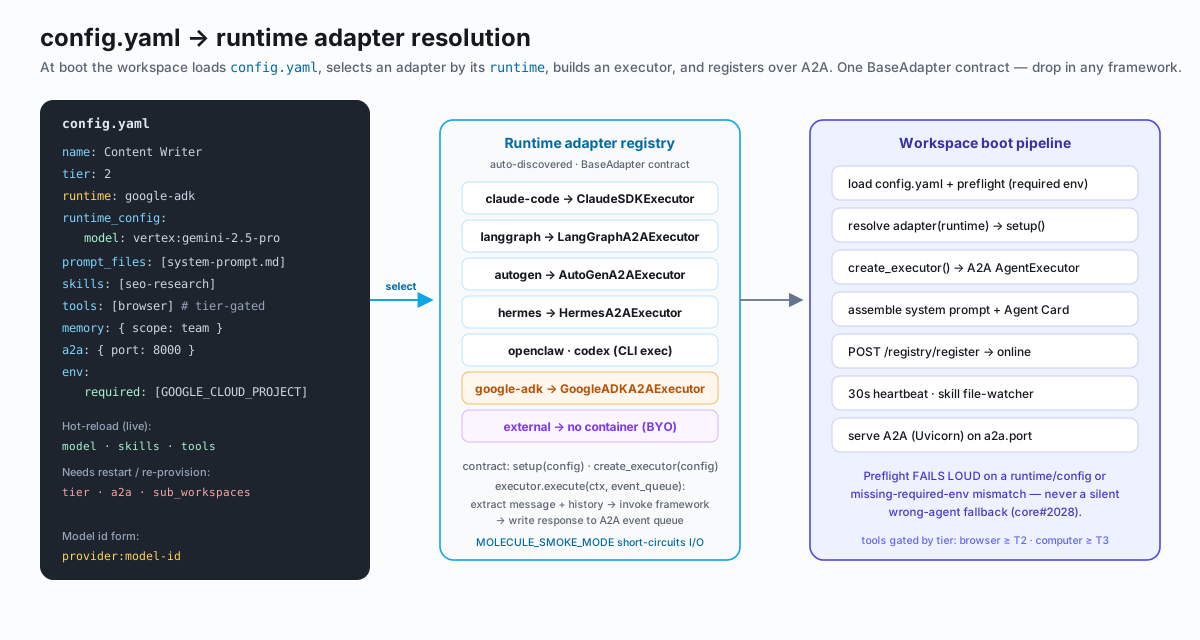
Every Molecule AI workspace is backed by a config.yaml file. The Config tab in the canvas lets you edit this file through a structured form or in raw YAML mode. Changes take effect on the next workspace restart.
Opening the Config tab
- Click any workspace node on the canvas to open its sidebar
- Select the Config tab
- Edit fields in the form view, or toggle Raw YAML in the top-right to edit
config.yamldirectly - Click Save to write the file, or Save & Restart to apply changes immediately
Claude Settings
The Claude Settings section of the Config tab exposes two primitives from the Claude Opus 4.7 API: effort level and task budget. These control how much reasoning work Claude does per turn — trading cost and latency for output quality.
Availability: Claude Settings are only shown for workspaces running runtime: claude-code or using a model whose name includes claude or anthropic. The section is hidden for other runtimes and models.
The section is collapsed by default. Click Claude Settings to expand it.
Effort levels
The Effort dropdown sets output_config.effort on the Claude Messages API call for every turn in this workspace.
| Value | Label | What it does | When to use |
|---|---|---|---|
| (unset) | — model default — | No effort field sent; Claude uses its built-in default | Everyday tasks where you want Claude to decide |
low | low | Minimal reasoning steps; fastest response, lowest cost | Quick lookups, simple rewrites, high-throughput pipelines where latency matters |
medium | medium | Balanced reasoning; Claude's typical quality for most tasks | General coding, writing, Q&A — a good starting point |
high | high | More deliberate reasoning; higher quality, higher cost | Code review, architecture decisions, nuanced analysis |
xhigh | xhigh (extended thinking) | Activates extended thinking. Claude works through the problem step-by-step before producing a final answer | Complex multi-step problems, hard debugging, long-range planning |
max | max — absolute ceiling | Maximum possible effort; extended thinking at full depth | Research-grade reasoning, competitive benchmarks, correctness-critical tasks where cost is not a constraint |
Tradeoffs
Higher effort levels improve output quality at the cost of latency and token spend:
- Cost scales roughly with reasoning depth.
maxcan produce significantly more tokens thanlowon the same prompt. - Latency increases with effort because Claude takes more reasoning steps before responding.
- Quality gains are most pronounced on tasks that require multi-step planning or where incorrect reasoning compounds (code generation, analysis, math).
For most workspaces, leaving effort unset or at medium is the right default. Move to high or above for specialist worker agents that handle tasks where errors are expensive — a security auditor, an architect, a final reviewer.
xhigh and max activate extended thinking, which is only available on Claude Opus 4.7 and later. Using these levels with earlier models or other providers will return an API error.
Task budget
The Task Budget field sets a token ceiling on how much thinking work Claude is allowed to do per turn. It maps to output_config.task_budget.total in the Messages API.
| Field | Type | Default | Minimum |
|---|---|---|---|
task_budget | integer (tokens) | 0 (unset) | 20,000 when set |
0 means unset — no task_budget field is sent and Claude uses its own internal limit.
When set to a non-zero value, Claude will not exceed that many tokens of thinking/reasoning per turn. This lets you cap spend on a per-workspace basis without changing the effort level.
When task budget applies
Task budget only has an effect when:
- The workspace is running
runtime: claude-codeor aclaude/anthropicmodel - The beta header
task-budgets-2026-03-13is enabled (see Beta header below) - The effort level is
xhighormax(extended thinking must be active for the budget to be exercised)
Setting a task_budget on a low/medium/high effort workspace is harmless — it will be sent but has no practical effect without extended thinking active.
Guidance
- 20,000 tokens is the beta minimum. Values below this are ignored by the API.
- 50,000–100,000 tokens covers most complex coding and analysis tasks.
- 200,000+ tokens is appropriate for research-grade or competitive-benchmark workloads.
- A tighter budget reduces cost on
xhigh/maxworkspaces but may truncate reasoning on very hard problems. Watch your workspace metrics and adjust if you see quality regressions.
Executor wiring — coming in the next release. The Config tab writes effort and task_budget to config.yaml today (PRs #639 and #654). The workspace executor that reads these values and passes them to the Claude SDK is tracked on the workspace-template side and will ship in the next release. Until that lands, the config is stored and visible but does not yet affect inference.
config.yaml reference
Both fields serialize as top-level keys in config.yaml:
name: Senior Reviewer
runtime: claude-code
model: anthropic:claude-opus-4-7
role: |
  You are a senior engineer performing code review. Be thorough.
tier: 3

# Claude Settings
effort: high
task_budget: 0 # 0 = unset; omitted from API callname: Architect
runtime: claude-code
model: anthropic:claude-opus-4-7
role: |
You design systems. Think deeply before recommending an architecture.
tier: 3
effort: xhigh
task_budget: 80000 # cap thinking at 80k tokens per turnname: Research Agent
runtime: claude-code
model: anthropic:claude-opus-4-7
role: |
You conduct research. Quality is the only constraint.
tier: 4
effort: max
# task_budget omitted — no ceiling on reasoning depthWhen task_budget is 0, toYaml() omits it from the file entirely — the field only appears in config.yaml when it holds a positive value.
Beta header requirement
The task_budget feature requires the Anthropic API beta header:
anthropic-beta: task-budgets-2026-03-13This header is added automatically by the workspace executor when task_budget > 0 is present in config.yaml. You do not need to set it manually in your workspace config — it is an implementation detail of the executor, not a user-configurable option.
If you call the Anthropic Messages API directly (outside of a Molecule AI workspace), you must include anthropic-beta: task-budgets-2026-03-13 in your request headers for output_config.task_budget to take effect. Omitting it causes the parameter to be silently ignored.
See also
- Concepts — Workspaces — workspace primitives overview
- Org Template — deploy effort/task_budget settings across an entire team via
org.yaml - Observability — monitor token usage per workspace to tune your budget settings
- API Reference — POST /workspaces
- Claude Opus 4.7 — Anthropic docs — upstream reference for
output_config