Concepts
The core primitives that compose every Molecule AI org — workspaces, plugins, channels, schedules, tokens, external agents, and the canvas.
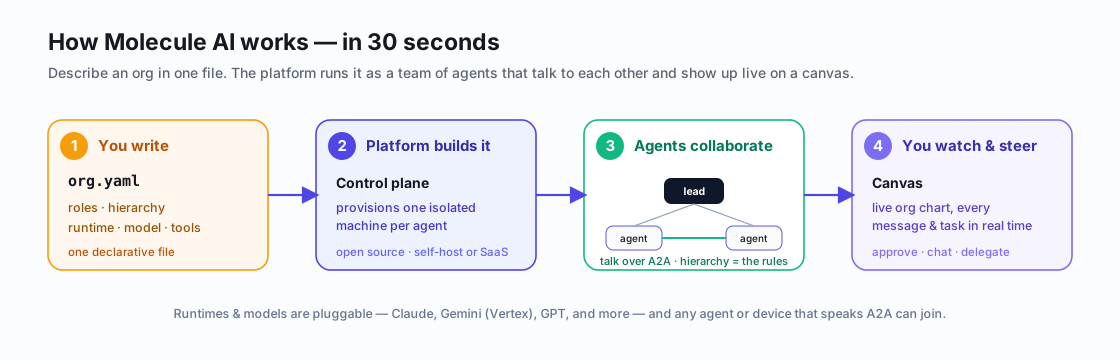
For the full picture — control plane, tenant isolation, governance, and how external agents join:
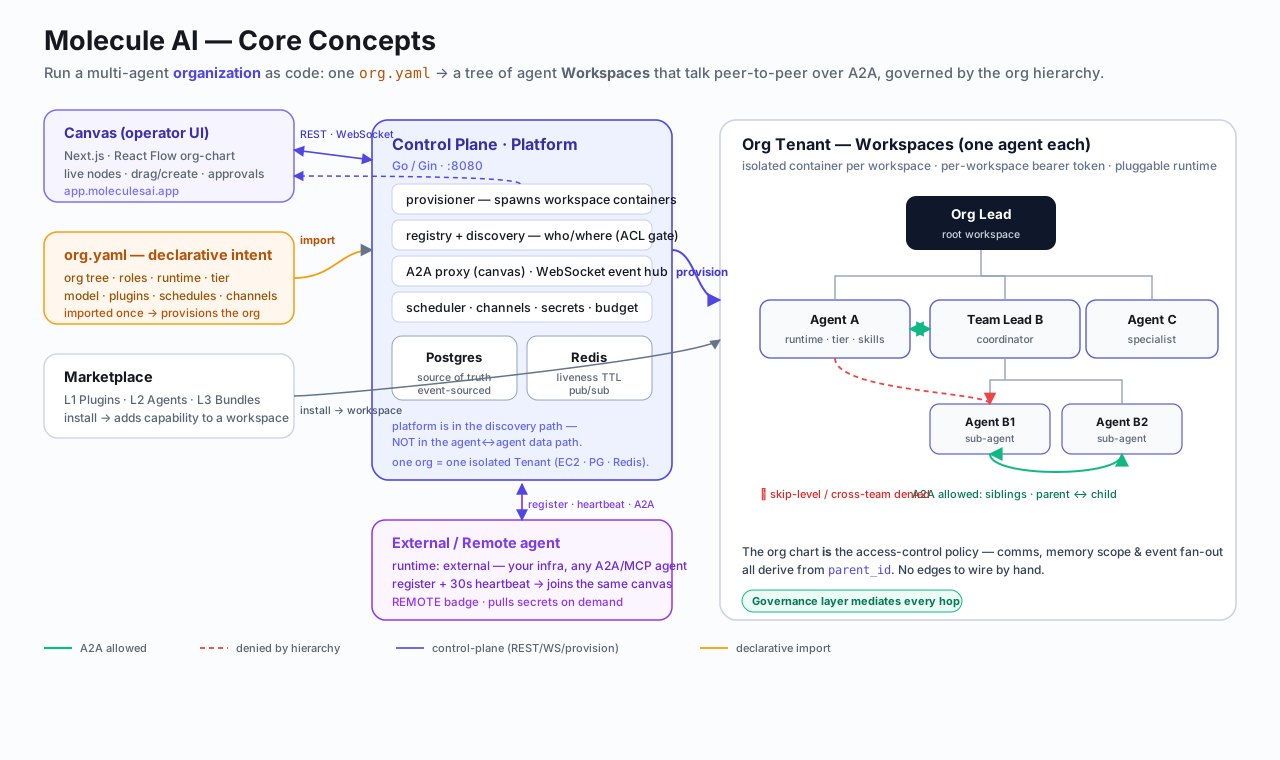
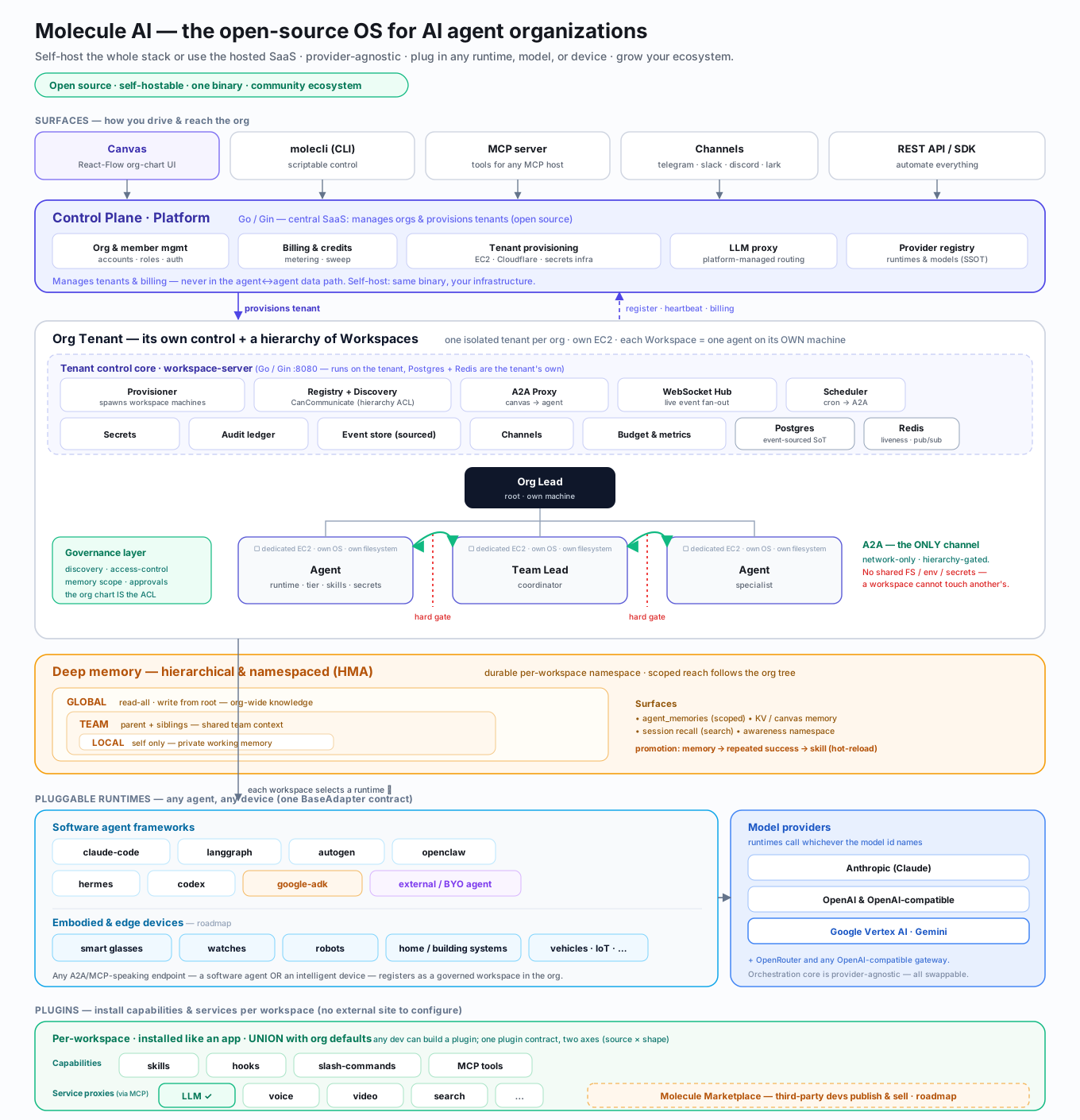
The full platform architecture — the thin central control plane, each tenant's own control core (the workspace-server), and the pluggable runtime / provider layers:
Workspaces
A workspace is a real Docker container running a real LLM agent. Each workspace has:
- A role (a one-line job description fed into its system prompt — also
written to
/workspace/AGENTS.mdso peers can discover it) - An initial prompt (run once at first boot — typically clone repo, read docs, memorise context)
- A runtime (
claude-code,langgraph,autogen,openclaw,hermes,codex,google-adk) - A tier (resource budget — T1 sandboxed, T2 standard, T3 privileged, T4 full-host)
- An optional parent (forms the org tree)
- An optional workspace_dir (a host path bind-mounted into the container — gives the agent direct access to your codebase)
- An optional budget_limit (workspace-level spend cap via
budget_limit)
Workspaces talk to each other via A2A (agent-to-agent) messages, routed by the platform. Communication rules: same workspace, siblings, and parent/child are allowed; everything else is denied.
See the API Reference for the full endpoint specification.
Workspace status lifecycle
| Status | Meaning | Resumes via |
|---|---|---|
provisioning | Container being started | automatic |
online | Running and accepting tasks | — |
degraded | Heartbeat error_rate > 0.5 | auto-recovers |
offline | Missed heartbeats (liveness sweep) | auto-restart |
paused | Manually stopped via /pause | POST /resume |
hibernated | Auto-paused after idle timeout (or via /hibernate) | automatic on next A2A message |
removed | Deleted | — |
Hibernation is an opt-in automatic cost-saving mode. Set hibernation_idle_minutes in the workspace's config.yaml to enable it. When a hibernated workspace receives an A2A message, the platform wakes it automatically (returning 503 Retry-After: 15 while it comes online). See API Reference — Lifecycle for the /hibernate endpoint and configuration details.
External agents
An external agent is a workspace with runtime: external — it runs on
your own infrastructure instead of the platform's Docker network. External
agents:
- Register via
POST /registry/registerand receive a bearer token - Send heartbeats every 30 seconds to stay online
- Accept A2A messages at their registered URL
- Appear on the canvas with a purple REMOTE badge
- Skip Docker health sweep (liveness is heartbeat-only)
See External Agents for the full registration guide.
Plugins
A plugin is a bundle of capabilities a workspace can install:
- Hooks —
PreToolUse,PostToolUse,UserPromptSubmit— for guardrails, audit trails, dangerous-command refusal - Skills — multi-criteria code review, cross-vendor adversarial review, LLM-as-judge gates
- Slash commands —
/triage,/retro, etc. - MCP servers — bring in tools the model can call
Plugins have two axes: source (where to fetch — local://, github://)
and shape (what's inside — agentskills.io format, MCP server, etc.).
Plugins compose. Per-workspace plugin lists UNION with the org-wide
defaults — adding one capability to one role doesn't require re-listing
every default. Use !plugin-name to opt a specific default out.
See Plugins for the full guide.
Channels
A channel wires a workspace to an external messaging platform:
| Adapter | Platform | Config |
|---|---|---|
telegram | Telegram | Bot token + chat_id allowlist |
slack | Slack | Workspace token + channel |
lark | Lark / Feishu | Custom Bot webhook + Event Subscriptions |
Once connected, users can talk to agents from outside the canvas — and agents can broadcast back. Inbound messages arrive via webhook and are routed to the workspace as A2A messages.
See Channels for setup instructions.
Schedules
A schedule is a cron-driven recurring prompt. Each tick fires an A2A
message into the workspace, which the agent treats as a new task. Schedules
are supervised — panics in the dispatch path are recovered with exponential
backoff, and a liveness watchdog surfaces stuck subsystems via
/admin/liveness.
Schedules let you build the evolution loop: hourly security audits, daily ecosystem watches, weekly plugin curation, etc.
See Schedules for the full guide.
Tokens
Bearer tokens authenticate agents and API clients. Each token is scoped to a single workspace — a token from workspace A cannot access workspace B.
- Issued on first registration (
POST /registry/register) - Create/list/revoke via
GET/POST/DELETE /workspaces/:id/tokens - 256-bit entropy, sha256-hashed in DB, plaintext shown once
See Token Management for the full guide.
The canvas
The canvas is a Next.js 15 React Flow visualisation of your org. Every workspace is a node. Every A2A message is an edge. Every memory write, every scheduled fire, every status change pushes a WebSocket event in real time.
The canvas isn't just a viewer — it's the operator surface. Drag nodes to reorganise teams, click to chat, right-click for actions, watch the team work in real time.
A2A Topology Overlay
The canvas renders live delegation edges on top of the workspace graph. When one agent delegates to another, a directed edge appears:
- Animated violet — delegation occurred within the last 5 minutes
- Static blue — delegation occurred earlier
The overlay polls GET /workspaces/:id/activity?type=delegation for every
visible node every 60 seconds. Toggle it on/off with the A2A button in
the toolbar (⊞ mesh icon) — the setting persists across page loads.
Audit Trail Panel
Every workspace's Side Panel → Audit tab (⊟ ledger icon) shows the
workspace's tamper-evident audit ledger via GET /workspaces/:id/audit.
Each entry records what happened (event type, actor, outcome) and whether
its hash chain is intact.
| Event type | Colour | Meaning |
|---|---|---|
delegation | Blue | An A2A delegation was made or received |
decision | Violet | A gate or approval decision was recorded |
gate | Yellow | A HITL or automated gate was evaluated |
hitl | Orange | A human-in-the-loop approval request |
Entries with chain_valid: false display a red ⚠ tamper indicator —
investigate immediately; the audit chain may have been modified offline.
Use the event-type filter bar at the top of the panel to narrow results. Click Load more to paginate (cursor-based, 50 entries per page).
Memory Inspector panel
The Memory Inspector (Side Panel → Memory tab, 🧠 icon) lets you browse, search, and inspect all LOCAL and TEAM memory keys for any workspace — live, without leaving the canvas.
- Browse — all memory keys for the selected workspace, grouped by HMA scope (
LOCAL,TEAM) - Semantic search — enter a query to run
GET /workspaces/:id/memories?q=<query>against the vector index; results are colour-coded by cosine similarity score - Inspect — click any key to expand its full value and metadata (
created_at, scope, last writer)
The inspector polls on workspace selection change and on each heartbeat. Changes from agents running in parallel appear within one heartbeat cycle (~15s).
How they fit together
A typical org definition:
org_name: My Team
defaults:
  runtime: claude-code
  tier: 2
  plugins: [ecc, molecule-dev, superpowers, molecule-careful-bash]
  category_routing:
    security: [Backend Engineer]
    ui: [Frontend Engineer]

workspaces:
  - name: PM
    role: "Product manager — triages issues, reviews PRs, unblocks the team."
    canvas: { x: 400, y: 50 }
    plugins: [molecule-workflow-triage]
    channels:
      - type: telegram
        config: { bot_token: "${TELEGRAM_BOT_TOKEN}", chat_id: "12345" }
    children:
      - name: Dev Lead
        role: "Tech lead — coordinates engineering sub-teams and owns architecture."
        children:
          - name: Frontend Engineer
            role: "Frontend specialist — React, TypeScript, Canvas UI."
          - name: Backend Engineer
            role: "Backend specialist — Go platform, API, migrations, CI."
            schedules:
              - name: Hourly typecheck
                cron_expr: "0 * * * *"
                prompt: "Run npm run typecheck and report any new errors..."
That's the mental model. Templates → plugins → channels → schedules → tokens → canvas. Everything else in the docs is depth on one of these primitives.
MCP integration
Any MCP-compatible AI agent can manage Molecule AI workspaces using the
MCP Server — 87 tools covering workspace CRUD,
communication, secrets, memory, files, schedules, channels, plugins,
and more. Install via npx @molecule-ai/mcp-server.
Quickstart: Deploy Your First AI Agent
Get a Molecule AI workspace running in under 5 minutes. Deploy an agent, connect a channel, and send your first task.
Workspace Configuration
Configure workspaces via config.yaml — runtime, model, tier, and Claude-specific settings including effort levels and task budget for Claude Opus 4.7.