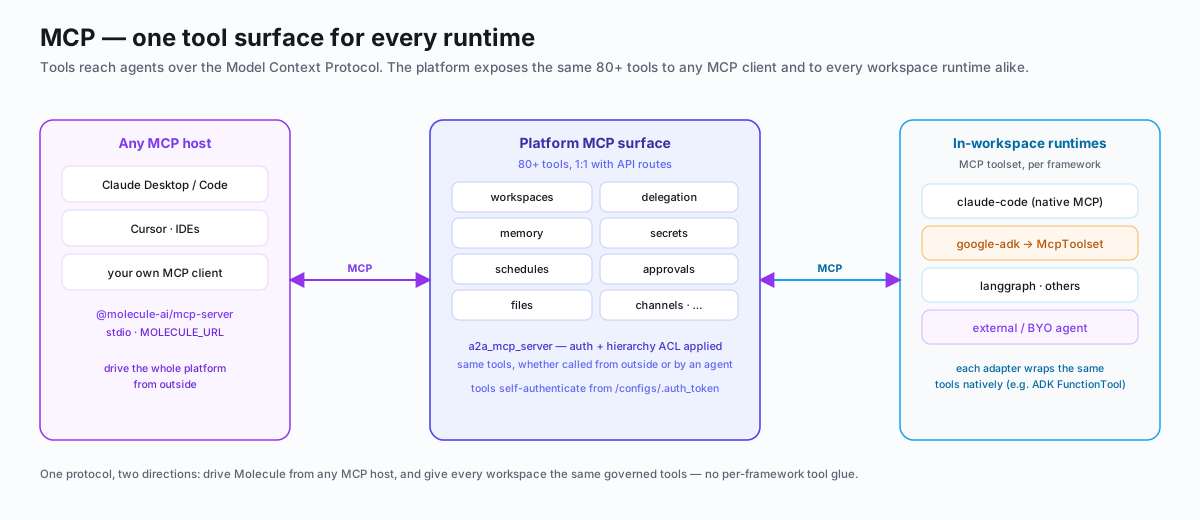
MCP Server Manage Molecule AI workspaces from any MCP-compatible AI agent using 87 tools.
The Molecule AI MCP server lets any MCP-compatible AI agent (Claude Code,
Cursor, etc.) manage workspaces, agents, secrets, memory, schedules,
channels, and more through the platform API.
npx @molecule-ai/mcp-server@1.0.0 { "mcpServers" : { "molecule" : { "type" : "stdio" , "command" : "npx" , "args" : [ "@molecule-ai/mcp-server@1.0.0" ], "env" : { "MOLECULE_URL" : "http://localhost:8080" } } } }
Pin the package version. The examples above use @1.0.0 — always specify an exact version and omit the -y flag. An unpinned npx -y @molecule-ai/mcp-server (no version) silently installs whatever npm serves on the next restart; if the package is ever compromised, it runs with your full MCP client permissions. Check npm for the latest stable release before upgrading.
For SaaS deployments, set MOLECULE_URL to your tenant URL:
"MOLECULE_URL" : "https://your-org.moleculesai.app" Auth via MOLECULE_API_KEY is planned for a future release.
Once configured, your MCP client should show 87 Molecule AI tools. Test with:
The MCP server exposes tools across these categories:
Tool API Route Description list_workspacesGET /workspacesList all workspaces create_workspacePOST /workspacesCreate a new workspace get_workspaceGET /workspaces/:idGet workspace details update_workspacePATCH /workspaces/:idUpdate workspace fields delete_workspaceDELETE /workspaces/:idDelete a workspace restart_workspacePOST /workspaces/:id/restartRestart container pause_workspacePOST /workspaces/:id/pausePause workspace resume_workspacePOST /workspaces/:id/resumeResume paused workspace
Tool API Route Description chat_with_agentPOST /workspaces/:id/a2aSend A2A message async_delegatePOST /workspaces/:id/delegateFire-and-forget delegation check_delegationsGET /workspaces/:id/delegationsCheck delegation status list_peersGET /registry/:id/peersFind peer workspaces notify_userPOST /workspaces/:id/notifyPush notification to canvas
Tool API Route Description get_configGET /workspaces/:id/configGet config.yaml update_configPATCH /workspaces/:id/configUpdate config list_secretsGET /workspaces/:id/secretsList secret keys set_secretPOST /workspaces/:id/secretsSet a secret set_global_secretPUT /settings/secretsSet a global secret
Tool API Route Description memory_listGET /workspaces/:id/memoryList memory keys memory_getGET /workspaces/:id/memory/:keyGet value memory_setPOST /workspaces/:id/memorySet key-value search_memoryGET /workspaces/:id/memoriesFull-text search
Tool API Route Description list_filesGET /workspaces/:id/filesList workspace files read_fileGET /workspaces/:id/files/*pathRead file content write_filePUT /workspaces/:id/files/*pathWrite file replace_all_filesPUT /workspaces/:id/filesReplace all files
Tool API Route Description list_schedulesGET /workspaces/:id/schedulesList cron schedules create_schedulePOST /workspaces/:id/schedulesCreate schedule run_schedulePOST /workspaces/:id/schedules/:id/runTrigger now
Tool API Route Description list_channelsGET /workspaces/:id/channelsList channels add_channelPOST /workspaces/:id/channelsAdd Telegram/Slack/Lark test_channelPOST /workspaces/:id/channels/:id/testTest connectivity send_channel_messagePOST /workspaces/:id/channels/:id/sendSend message
Tool API Route Description list_installed_pluginsGET /workspaces/:id/pluginsList installed install_pluginPOST /workspaces/:id/pluginsInstall from source uninstall_pluginDELETE /workspaces/:id/plugins/:nameUninstall
Tool API Route Description list_tokensGET /workspaces/:id/tokensList workspace tokens create_tokenPOST /workspaces/:id/tokensCreate bearer token revoke_tokenDELETE /workspaces/:id/tokens/:idRevoke token
Tool API Route Description list_templatesGET /templatesAvailable templates import_orgPOST /org/importImport org template export_bundleGET /bundles/export/:idExport workspace import_bundlePOST /bundles/importImport workspace
Variable Default Description MOLECULE_URLhttp://localhost:8080Platform API URL MOLECULE_API_KEY— Bearer token for platform authentication (planned)
The MCP server uses stdio transport — the client (Claude Code, Cursor, etc.) spawns the server as a child process and communicates via JSON-RPC over stdin/stdout. Configure in your AI client's mcp.json as shown in Quick start above.
Issue Fix Connection refused Check MOLECULE_URL points to running platform 401 Unauthorized Token expired or revoked — create a new one Tools not showing Run npx @molecule-ai/mcp-server@1.0.0 standalone to check errors