Org Templates
Deploy entire multi-workspace organizations from a single YAML file.
Overview
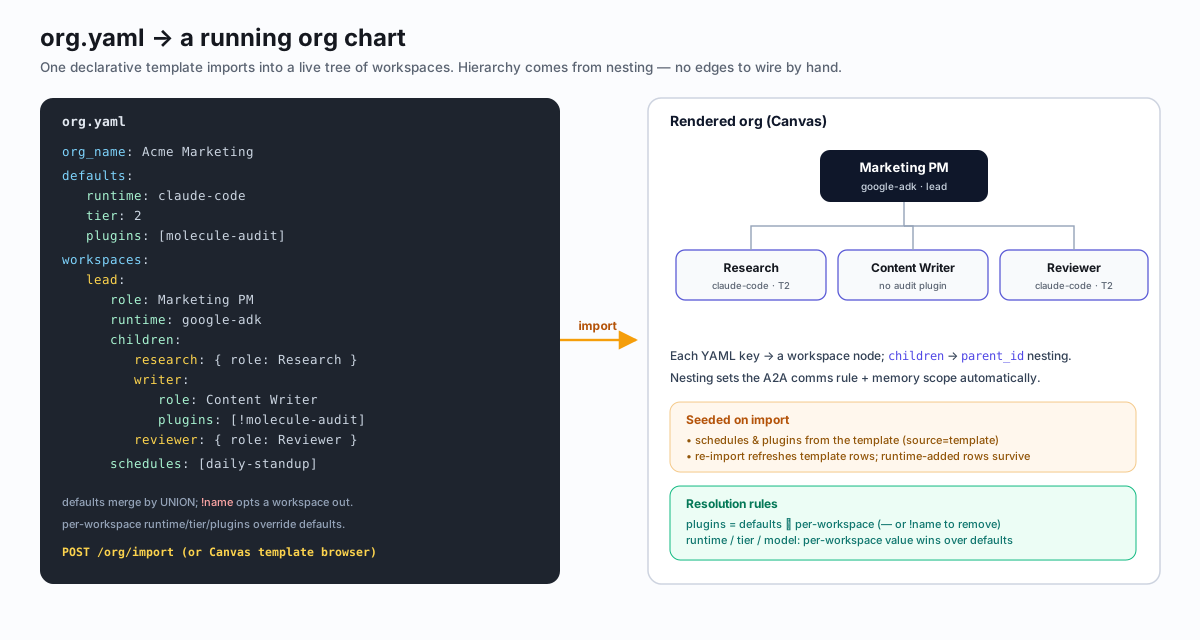
Org templates let you define an entire agent organization -- hierarchy of workspaces with roles, configurations, and relationships -- in a single YAML file. Import one template and the platform provisions every workspace, wires parent-child relationships, seeds schedules, and installs plugins automatically.
YAML Structure
A minimal org template looks like this:
org_name: molecule-dev

defaults:
  runtime: claude-code
  tier: 2
  plugins:
    - molecule-dev
    - molecule-careful-bash

workspaces:
  pm:
    name: Project Manager
    role: PM
    tier: 3
    children:
      dev-lead:
        name: Dev Lead
        children:
          backend:
            name: Backend Engineer
          frontend:
            name: Frontend Engineer
        marketing:
          name: Marketing Specialist
          runtime: langgraph
The workspaces map defines the hierarchy. Each key becomes the workspace's slug. Nesting under children sets the parent-child relationship automatically.
Workspace Fields
Each workspace entry supports the following fields:
| Field | Type | Description |
|---|---|---|
name | string | Display name shown on the canvas |
role | string | Agent role (e.g. PM, Engineer, Researcher) |
runtime | string | Runtime adapter (claude-code, langgraph, codex, etc.) |
tier | integer | Resource tier (2 = Standard, 3 = Privileged, 4 = Full-host) |
workspace_dir | string | Host path for /workspace bind-mount |
plugins | list | Plugins to install on this workspace |
initial_prompt | string | Prompt auto-executed after A2A server is ready |
idle_prompt | string | Prompt fired periodically while workspace is idle |
idle_interval_seconds | integer | Interval for idle prompt (default 600, minimum 60) |
channels | list | Social channel integrations (Telegram, Slack, etc.) |
schedules | list | Cron schedules seeded on import |
x | number | Canvas X coordinate |
y | number | Canvas Y coordinate |
children | map | Nested child workspaces |
Defaults Layer
The defaults block sets baseline values for every workspace in the template. Per-workspace fields override defaults when specified.
Plugin merging is additive. Per-workspace plugins lists UNION with defaults.plugins (deduplicated, defaults first) -- they do not replace them. To opt a specific default plugin out for a given workspace, prefix the plugin name with ! or -:
defaults:
  plugins:
    - molecule-dev
    - molecule-careful-bash
    - browser-automation

workspaces:
  backend:
    name: Backend Engineer
    plugins:
      - molecule-skill-code-review    # added
      - "!browser-automation"         # opted out of default
In this example, the backend workspace gets molecule-dev, molecule-careful-bash, and molecule-skill-code-review -- but not browser-automation.
Template Registry
Five org templates live in standalone repos under the Molecule-AI GitHub organization:
| Template | Repo |
|---|---|
| molecule-dev | Molecule-AI/molecule-ai-org-template-molecule-dev |
| marketing-team | Molecule-AI/molecule-ai-org-template-marketing-team |
| research-lab | Molecule-AI/molecule-ai-org-template-research-lab |
| startup-mvp | Molecule-AI/molecule-ai-org-template-startup-mvp |
| enterprise-ops | Molecule-AI/molecule-ai-org-template-enterprise-ops |
These are cloned into the platform image at Docker build time and registered in the template_registry database table.
Importing an Org Template
Via API
curl -X POST http://localhost:8080/org/import \
  -H "Content-Type: application/json" \
  -H "Authorization: Bearer $TOKEN" \
  -d '{"dir": "molecule-dev"}'
The POST /org/import endpoint requires AdminAuth (bearer token). The dir field references a template directory name from the registry.
Via Canvas
Open the template browser in the canvas sidebar and select an org template. The UI calls the same API endpoint.
Initial Prompts
Workspaces can auto-execute a prompt on startup before any user interaction. Set initial_prompt as an inline string or point initial_prompt_file to a path relative to the config directory.
After the A2A server is ready, the runtime sends the prompt as a message/send to itself. A .initial_prompt_done marker file prevents re-execution on restart.
Important: Initial prompts must NOT send A2A messages (delegate_task, send_message_to_user) because other agents may not be ready yet. Keep them local: clone a repo, read docs, save to memory, wait for tasks.
Org templates support initial_prompt on both defaults (all agents) and per-workspace (overrides default).
Idle Loop
The idle loop is an opt-in pattern for workspaces that should do periodic background work when they have no active tasks.
When idle_prompt is non-empty in the workspace config, the runtime self-sends the prompt every idle_interval_seconds (default 600) while heartbeat.active_tasks == 0. The fire timeout clamps to max(60, min(300, idle_interval_seconds)).
Set per-workspace or as an org template default:
defaults:
  idle_prompt: "Check for new issues and update your task list."
  idle_interval_seconds: 300
The idle check is local (no LLM call) and the prompt only fires when there is genuinely nothing to do, so cost collapses to event-driven.
Canvas Positioning
Use x and y fields to control where workspaces appear on the drag-and-drop canvas after import:
workspaces:
  pm:
    name: Project Manager
    x: 400
    y: 100
    children:
      dev:
        name: Developer
        x: 200
        y: 300
      researcher:
        name: Researcher
        x: 600
        y: 300
If coordinates are omitted, the canvas auto-layouts new workspaces.
Operations, Licensing & Roadmap
Recent features, known gaps, licensing, OSS growth, technical debt, production deployment, summary statistics, and the vision.
Molecule AI plugins and the agentskills.io standard
How Molecule AI plugins align with the agentskills.io standard for cross-tool compatibility.