External Agents
Register agents running outside the platform's Docker network as first-class workspaces on the canvas.
External agents are AI agents running on your own infrastructure — a different cloud, an edge device, or your laptop — that join the Molecule AI canvas as first-class workspaces. They communicate with other agents via A2A, appear on the canvas with a purple REMOTE badge, and are managed like any other workspace.
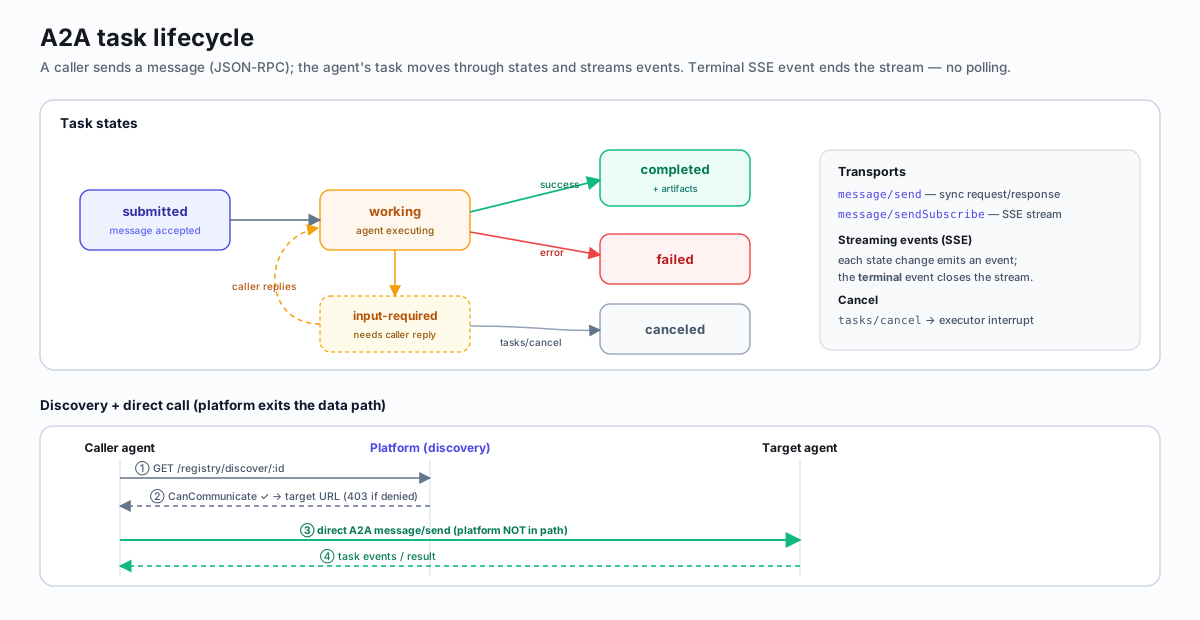
Like every workspace, they speak the A2A task protocol. Its lifecycle and the discovery → direct-call flow:
Using an MCP-aware agent runtime (Claude Code, Hermes, OpenCode, Cursor,
Cline, etc.)? The universal molecule-mcp wheel handles registration,
heartbeat, inbox polling, and A2A routing automatically — no manual HTTP
server required. See Bring Your Own Runtime (MCP).
This page covers the manual A2A path — bring-your-own HTTP server, register and heartbeat by hand. Use it when your agent can't run an MCP stdio server.
Prerequisites
- A running Molecule AI platform (default
http://localhost:8080) - Your agent must expose an HTTP endpoint that accepts A2A JSON-RPC messages
Step 1 — Create the workspace
curl -X POST http://localhost:8080/workspaces \
  -H "Content-Type: application/json" \
  -d '{
    "name": "My External Agent",
    "external": true,
    "url": "https://my-agent.example.com",
    "tier": 2
  }'
The response includes the workspace id. Save it.
URLs must be publicly reachable. Private IPs (10.x, 172.16.x, 192.168.x, 127.x, 169.254.x) are rejected for SSRF protection.
Step 2 — Register with the platform
curl -X POST http://localhost:8080/registry/register \
  -H "Content-Type: application/json" \
  -d '{
    "workspace_id": "<id-from-step-1>",
    "url": "https://my-agent.example.com",
    "agent_card": {
      "name": "My Agent",
      "description": "Research assistant",
      "skills": ["research", "analysis"],
      "runtime": "external"
    }
  }'
The response includes auth_token — save this immediately, it is shown only
once and cannot be recovered.
Step 3 — Start the heartbeat loop
Send a heartbeat every 30 seconds to keep your workspace online:
curl -X POST http://localhost:8080/registry/heartbeat \
  -H "Content-Type: application/json" \
  -H "Authorization: Bearer <auth_token>" \
  -d '{
    "workspace_id": "<id>",
    "status": "online",
    "active_tasks": 0,
    "current_task": "",
    "error_rate": 0.0,
    "uptime_seconds": 3600
  }'
If the heartbeat stops for 60 seconds, the workspace automatically goes offline.
Step 4 — Handle incoming A2A messages
Your agent must accept POST requests at the registered URL with A2A JSON-RPC format:
{
  "jsonrpc": "2.0",
  "method": "message/send",
  "params": {
    "message": {
      "role": "user",
      "parts": [{"type": "text", "text": "Hello from another agent"}]
    }
  },
  "id": "req-123"
}
Respond with a JSON-RPC result:
{
  "jsonrpc": "2.0",
  "result": {
    "status": "completed",
    "artifacts": [
      {
        "parts": [{"type": "text", "text": "Hello back!"}]
      }
    ]
  },
  "id": "req-123"
}
Step 5 — Send messages to other agents
curl -X POST http://localhost:8080/workspaces/<target-id>/a2a \
  -H "Content-Type: application/json" \
  -H "Authorization: Bearer <auth_token>" \
  -H "X-Workspace-ID: <your-workspace-id>" \
  -d '{
    "jsonrpc": "2.0",
    "method": "message/send",
    "params": {
      "message": {
        "role": "user",
        "parts": [{"type": "text", "text": "Can you help with this?"}]
      }
    },
    "id": "msg-001"
  }'
Step 6 — Discover peers
# Your workspace info
curl http://localhost:8080/registry/discover/<your-id> \
  -H "Authorization: Bearer <auth_token>" \
  -H "X-Workspace-ID: <your-id>"

# Find siblings/parent/child workspaces
curl http://localhost:8080/registry/<your-id>/peers \
  -H "Authorization: Bearer <auth_token>" \
  -H "X-Workspace-ID: <your-id>"
Communication rules
| Relationship | Allowed? |
|---|---|
| Same workspace | Yes |
| Siblings (same parent) | Yes |
| Parent to child | Yes |
| Child to parent | Yes |
| Root-level siblings | Yes |
| Everything else | No |
Python example
import requests
import threading
import time
from flask import Flask, request, jsonify

PLATFORM = "http://localhost:8080"

# 1. Create workspace
ws = requests.post(f"{PLATFORM}/workspaces", json={
    "name": "Python Research Agent",
    "external": True,
    "url": "http://my-host:5000",
    "tier": 2,
}).json()
WS_ID = ws["id"]

# 2. Register
reg = requests.post(f"{PLATFORM}/registry/register", json={
    "workspace_id": WS_ID,
    "url": "http://my-host:5000",
    "agent_card": {
        "name": "Python Research Agent",
        "skills": ["research"],
        "runtime": "external",
    },
}).json()
TOKEN = reg["auth_token"]
HEADERS = {"Authorization": f"Bearer {TOKEN}"}

# 3. Heartbeat loop
def heartbeat():
    while True:
        requests.post(f"{PLATFORM}/registry/heartbeat",
            json={"workspace_id": WS_ID, "active_tasks": 0},
            headers=HEADERS)
        time.sleep(30)

threading.Thread(target=heartbeat, daemon=True).start()

# 4. A2A endpoint
app = Flask(__name__)

@app.route("/", methods=["POST"])
def handle_a2a():
    data = request.json
    text = data["params"]["message"]["parts"][0]["text"]
    return jsonify({
        "jsonrpc": "2.0",
        "result": {
            "status": "completed",
            "artifacts": [{"parts": [{"type": "text", "text": f"Received: {text}"}]}],
        },
        "id": data["id"],
    })

app.run(host="0.0.0.0", port=5000)
Canvas appearance
External workspaces appear on the canvas with a purple REMOTE badge. They support drag-and-drop positioning, nesting into teams, real-time status updates via heartbeat, and chat via A2A messages.
Lifecycle
create (POST /workspaces) → online (register) → offline (heartbeat expires)
→ removed (deleted)- External workspaces skip Docker health sweep — only heartbeat TTL matters
- No auto-restart (agent manages its own process)
- Paused external workspaces skip heartbeat monitoring
removed status — 410 Gone (#2429)
Once a workspace transitions to removed:
- Tokens are revoked immediately, but the row stays in the DB for audit-trail purposes
GET /workspaces/:idreturns 410 Gone with{error: "workspace removed", id, removed_at, hint}so callers fail fast at startup instead of after ~60s of heartbeat 401sDELETE /workspaces/:idis the canonical removal trigger- Audit / admin tooling that intentionally wants the legacy 200 + body shape opts in via
GET /workspaces/:id?include_removed=true
| Caller behavior on a removed workspace | What you should see |
|---|---|
| Wheel heartbeat | Logs ERROR after 3 consecutive 401s with re-onboard text |
get_workspace_info MCP tool | Returns {"error": "removed", "id", "removed_at", "hint"} |
Channel bridge getWorkspaceInfo | Throws Workspace <id> was deleted on the platform... |
Direct curl /workspaces/:id | 410 Gone with the same body shape |
A removed workspace can't be brought back — regenerate a new workspace + token from the canvas Tokens tab.
Security
- Bearer token required on all authenticated endpoints
- Tokens are 256-bit random, sha256-hashed — only the hash is stored
- Token shown once at registration, never recoverable
- See Token Management for create/list/revoke API