Architecture
System architecture, components, infrastructure, and communication model for the Molecule AI platform.
Architecture
Molecule AI is an open-source operating system for AI agent organizations — run the entire stack yourself (self-hosted) or use the hosted SaaS. It orchestrates agent workspaces that form an organizational hierarchy: each workspace registers with a control plane, runs on its own dedicated machine, communicates over the A2A (Agent-to-Agent) protocol, and appears live on a drag-and-drop canvas. The core is provider-agnostic — runtimes, models, and even physical devices are pluggable — so the ecosystem grows without forking the platform.
System Overview
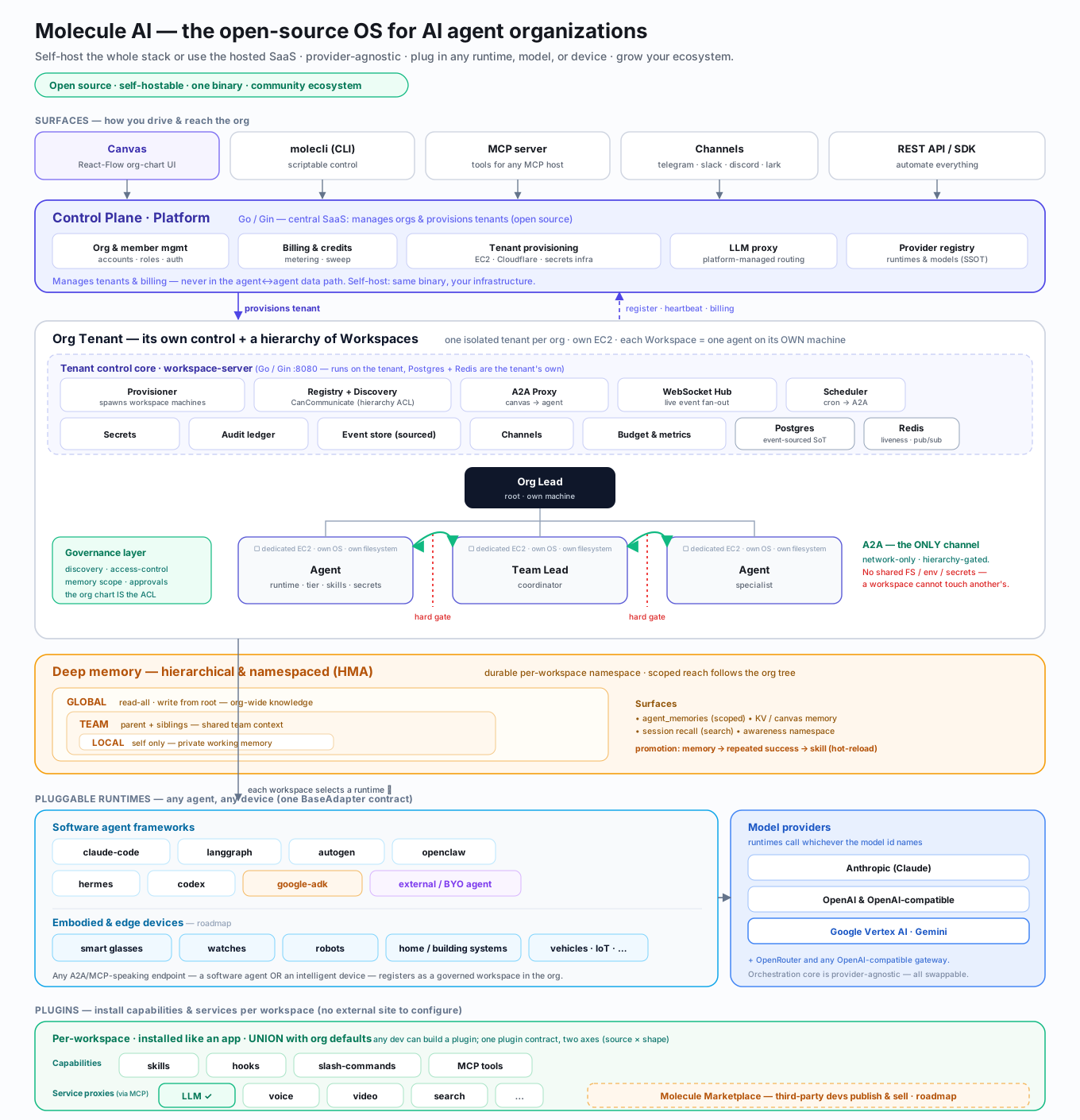
Three properties define the architecture:
- Hard isolation by machine. Every workspace is one agent on its own dedicated machine (own OS, filesystem, secrets). Workspaces cannot read each other's environment — there is no shared disk or shared process space. A2A over the network is the only sanctioned channel, and it is gated by the org hierarchy (
CanCommunicate). - Anything can be a runtime. Behind one
BaseAdaptercontract, a workspace can be any agent framework (claude-code, langgraph, autogen, openclaw, hermes, codex, google-adk), an external/BYO agent, or — on the roadmap — an intelligent device: smart glasses, watches, robots, home/building systems, vehicles. Any A2A/MCP-speaking endpoint joins the org as a governed workspace. Models are equally pluggable (Anthropic, OpenAI/-compatible, Google Vertex/Gemini, OpenRouter). - Deep, namespaced memory. A hierarchical memory architecture (HMA) gives each workspace a durable namespace and three scopes — LOCAL (private), TEAM (parent + siblings), GLOBAL (org-wide) — whose reach follows the same org tree as communication.
A text summary of the same flow:
Canvas (Next.js :3000) <--WebSocket--> Platform (Go :8080) <--HTTP--> Postgres + Redis
                                                                        |
                                        Workspace A <----A2A----> Workspace B
                                        (Python agents)
                                              | register/heartbeat |
                                              +------ Platform ----+
This is the per-tenant view: the Canvas provides the visual interface, the Platform (the tenant's workspace-server) is the tenant's control core, and Workspaces are isolated machines running AI agent runtimes. All inter-agent communication is mediated by the Platform via the A2A proxy, which enforces hierarchical access control. Above all tenants sits the central control plane (api.moleculesai.app), which provisions tenants and handles orgs and billing.
Four Main Components
Canvas
Stack: Next.js 15 + React Flow (@xyflow/react v12) + Zustand + Tailwind CSS
The Canvas is the browser-based visual workspace graph. It provides:
- Drag-and-drop layout with persistent node positions (saved via
PATCH /workspaces/:id) - Team nesting using recursive
TeamMemberChipcomponents (up to 3 levels deep) - Real-time status via WebSocket connection to the Platform
- Chat interface with two sub-tabs: "My Chat" (user-to-agent) and "Agent Comms" (agent-to-agent A2A traffic)
- Config editor with "Save & Restart" and "Save" (deferred restart) modes
- Secrets management with auto-restart on POST/DELETE
State management:
| Concern | Mechanism |
|---|---|
| Initial load | HTTP fetch GET /workspaces into Zustand |
| Real-time updates | WebSocket events via applyEvent() |
| Position persistence | onNodeDragStop sends PATCH /workspaces/:id with {x, y} |
| Node nesting | nestNode sets hidden: !!targetId; children render inside parent |
Environment variables:
| Variable | Default | Purpose |
|---|---|---|
NEXT_PUBLIC_PLATFORM_URL | http://localhost:8080 | Platform API base URL |
NEXT_PUBLIC_WS_URL | ws://localhost:8080/ws | WebSocket endpoint |
Platform
Stack: Go / Gin (workspace-server)
The Platform is the per-tenant control core — one instance runs on each org's
tenant (a *.moleculesai.app instance in SaaS, or your own host when self-hosted)
and owns everything for that org's workspaces:
- Workspace CRUD -- create, read, update, delete workspaces
- Registry -- workspace registration, heartbeat tracking, agent card management
- Discovery -- peer lookup, access control checks
- WebSocket hub -- real-time event broadcasting to Canvas clients
- Liveness monitoring -- three-layer container health detection
- A2A proxy -- routes inter-agent messages with hierarchical access control
- Provisioner -- workspace machine/container lifecycle with tier-based resource limits
- Scheduler -- cron-based scheduled tasks per workspace
- Channel adapters -- social integrations (Telegram, Slack, etc.)
It is not the central SaaS control plane. A separate
central control plane (api.moleculesai.app,
molecule-controlplane) handles org & member management, billing & credits, the
LLM proxy, the provider registry, and tenant provisioning — it spins up each
org's tenant, and that tenant then runs its own Platform instance above. The
Platform's Postgres and Redis (below) are the tenant's own, not shared
across orgs.
Key environment variables:
| Variable | Default | Purpose |
|---|---|---|
DATABASE_URL | (required) | Postgres connection string |
REDIS_URL | (required) | Redis connection string |
PORT | 8080 | Server listen port |
PLATFORM_URL | http://host.docker.internal:PORT | URL passed to agent containers |
SECRETS_ENCRYPTION_KEY | (optional) | AES-256 key, 32 bytes |
CORS_ORIGINS | http://localhost:3000,http://localhost:3001 | Allowed CORS origins |
RATE_LIMIT | 600 | Requests per minute |
MOLECULE_ENV | (optional) | Set production to hide test endpoints |
MOLECULE_ORG_ID | (optional) | SaaS tenant org gating |
WORKSPACE_DIR | (optional) | Global fallback host path for /workspace bind-mount |
AWARENESS_URL | (optional) | Injected into workspace containers for cross-session memory |
ACTIVITY_RETENTION_DAYS | 7 | How long activity logs are kept |
ACTIVITY_CLEANUP_INTERVAL_HOURS | 6 | Cleanup sweep interval |
Workspace tier resource limits:
| Tier | Env (Memory) | Env (CPU) | Defaults |
|---|---|---|---|
| Standard (Tier 2) | TIER2_MEMORY_MB | TIER2_CPU_SHARES | 512 MB / 1 CPU |
| Privileged (Tier 3) | TIER3_MEMORY_MB | TIER3_CPU_SHARES | 2048 MB / 2 CPU |
| Full-host (Tier 4) | TIER4_MEMORY_MB | TIER4_CPU_SHARES | 4096 MB / 4 CPU |
Workspace Runtime
Published as: molecule-ai-workspace-runtime on PyPI
The shared runtime provides the base agent infrastructure: A2A server, heartbeat loop, config loading, platform auth, plugin system, and built-in tools. Most AI framework adapters live in their own standalone repository.
| Runtime | Standalone Repo | Key Dependencies |
|---|---|---|
| LangGraph | molecule-ai-workspace-template-langgraph | langchain-anthropic, langgraph |
| Claude Code | molecule-ai-workspace-template-claude-code | claude-agent-sdk, @anthropic-ai/claude-code |
| AutoGen | molecule-ai-workspace-template-autogen | autogen |
| Hermes | molecule-ai-workspace-template-hermes | openai, anthropic, google-genai |
| Codex | codex | OpenAI Codex CLI |
openclaw and google-adk ship as platform-bundled runtime templates (Gemini 2.5 Pro on Vertex AI via keyless ADC for google-adk); external is a bring-your-own agent with no platform-managed container. The canonical runtime set is the control-plane provider registry.
Each adapter repo has its own Dockerfile that installs molecule-ai-workspace-runtime from PyPI plus adapter-specific dependencies. Templates are cloned at Docker build time into the platform image via manifest.json.
Framework Adapters (workspace-template)
Some workspace templates embed framework-specific adapters that extend molecule-ai-workspace-runtime with framework-level security controls. The smolagents adapter (workspace-template/adapters/smolagents/) ships two such controls:
Environment sanitization (make_safe_env) — child processes spawned by the smolagents adapter inherit a filtered copy of the host environment. The following are stripped before the subprocess starts:
- Any key listed in
SMOLAGENTS_ENV_DENYLIST(comma-separated; set by the operator) - Any key whose name ends in
_API_KEYor_TOKEN
Set SMOLAGENTS_ENV_DENYLIST=VAR1,VAR2 in the workspace's secrets to extend the denylist.
Safe message delivery (safe_send_message) — outbound smolagents messages are:
- Prefixed with
[smolagents]so the source is always attributable in logs and Canvas activity - Truncated at 2 000 characters to prevent oversized payloads
- HTML-entity-escaped to block social-engineering injections embedded in agent output
These controls complement the platform-level secret redaction described in the API Reference.
molecli
Stack: Go / Bubbletea + Lipgloss
A terminal UI dashboard for real-time workspace monitoring, event log streaming, health overview, and delete/filter operations. Reads MOLECLI_URL (default http://localhost:8080) to locate the platform. Now published as a standalone repo at git.moleculesai.app/molecule-ai/molecule-cli.
Infrastructure Services
All services run via docker-compose.infra.yml, attached to the shared molecule-monorepo-net network. Start them with:
./infra/scripts/setup.sh # Start Postgres, Redis, Langfuse, Temporal; run migrationsPostgres (port 5432)
Primary datastore for workspaces, events, activity logs, secrets, schedules, channels, and more. Also backs Langfuse and Temporal via separate databases.
Key tables:
| Table | Purpose |
|---|---|
workspaces | Core entity -- status, runtime, agent_card, heartbeat, current_task |
canvas_layouts | Persisted x/y positions |
structure_events | Append-only event log |
activity_logs | A2A communications, task updates, agent logs, errors |
workspace_schedules | Cron tasks with expression, timezone, prompt, run history |
workspace_channels | Social channel integrations with JSONB config |
workspace_secrets / global_secrets | Encrypted secrets storage |
workspace_auth_tokens | Bearer tokens (auto-revoked on workspace delete) |
agent_memories | HMA-scoped agent memory |
approvals | Human-in-the-loop approval requests |
Migration runner: On startup, the platform globs *.sql in the migrations directory, filters out .down.sql files, sorts alphabetically, and executes each. All .up.sql files must be idempotent (CREATE TABLE IF NOT EXISTS, ALTER TABLE ... IF NOT EXISTS).
JSONB gotcha: When inserting Go []byte (from json.Marshal) into Postgres JSONB columns, you must convert to string() first and use ::jsonb cast in SQL. The lib/pq driver treats []byte as bytea, not JSONB.
Redis (port 6379)
Used for pub/sub event broadcasting and heartbeat TTL tracking. Workspace heartbeat keys expire after 60 seconds -- expiry triggers the liveness monitor.
Langfuse (port 3001)
LLM trace viewer backed by ClickHouse. Provides observability into agent LLM calls, token usage, and latency.
Temporal (port 7233 gRPC, port 8233 Web UI)
Durable workflow engine for workspace-template/builtin_tools/temporal_workflow.py. Dev-only posture: the auto-setup image runs with no auth on 0.0.0.0:7233. Production deployments must gate access via mTLS or an API key / reverse proxy.
Communication Model
WebSocket Events Flow
1. Action occurs (register, heartbeat, config change, etc.)
2. broadcaster.RecordAndBroadcast()
   -> inserts into structure_events table
   -> publishes to Redis pub/sub
3. Redis subscriber relays to WebSocket hub
4. Hub broadcasts to:
   - Canvas clients (all events)
   - Workspace clients (filtered by CanCommunicate)
A2A Proxy
The A2A proxy (POST /workspaces/:id/a2a) routes agent-to-agent messages. The caller identifies itself via the X-Workspace-ID header and authenticates with Authorization: Bearer <token>.
Access Control Rules
Determined by CanCommunicate(callerID, targetID) in registry/access.go:
| Relationship | Allowed |
|---|---|
| Same workspace (self-call) | Yes |
Siblings (same parent_id) | Yes |
Root-level siblings (both parent_id IS NULL) | Yes |
| Parent to child / child to parent | Yes |
System callers (webhook:*, system:*, test:*) | Yes (bypass) |
Canvas requests (no X-Workspace-ID) | Yes (bypass) |
| Everything else | Denied |
Import Cycle Prevention
The platform uses function injection to avoid Go import cycles between ws, registry, and events packages:
ws.NewHub(canCommunicate AccessChecker)-- Hub acceptsregistry.CanCommunicateas a functionregistry.StartLivenessMonitor(ctx, onOffline OfflineHandler)-- Liveness accepts broadcaster callbackregistry.StartHealthSweep(ctx, checker ContainerChecker, interval, onOffline)-- Health sweep accepts Docker checker interface- Wiring happens in
platform/cmd/server/main.go-- init order:wh -> onWorkspaceOffline -> liveness/healthSweep -> router
Container Health Detection
Three independent layers detect dead containers (e.g., Docker Desktop crash):
Layer 1: Passive (Redis TTL)
Each workspace sends heartbeats that set a Redis key with a 60-second TTL. When the key expires, the liveness monitor detects the workspace as offline and triggers an auto-restart.
Layer 2: Proactive (Health Sweep)
registry.StartHealthSweep polls the Docker API every 15 seconds. Catches dead containers faster than waiting for Redis TTL expiry.
Layer 3: Reactive (A2A Proxy)
When the A2A proxy encounters a connection error to a workspace, it immediately checks provisioner.IsRunning(). If the container is dead, it marks the workspace offline and triggers a restart.
All three layers call onWorkspaceOffline, which broadcasts WORKSPACE_OFFLINE and initiates wh.RestartByID(). Redis cleanup uses the shared db.ClearWorkspaceKeys() function.
Workspace Lifecycle
provisioning --> online (on register)
     ^              |
     |         degraded (error_rate > 0.5)
     |              |
     |           online (recovered)
     |              |
     |          offline (Redis TTL expired / health sweep)
     |              |
     +--- auto-restart ---+
                    |
                 removed (deleted)

Any state --> paused (user pauses) --> provisioning (user resumes)
Paused workspaces skip health sweep, liveness monitor, and auto-restart.
Restart context: After any restart and successful re-registration, the platform sends a synthetic A2A message/send with metadata.kind=restart_context containing the restart timestamp, previous session info, and available env-var keys (keys only, never values). The sender uses the system:restart-context caller prefix to bypass CanCommunicate. If the workspace does not re-register within 30 seconds, the message is dropped.
Initial prompt: Agents can auto-execute a prompt on startup before any user interaction. Configure via initial_prompt (inline string) or initial_prompt_file (path relative to config dir) in config.yaml. A .initial_prompt_done marker file prevents re-execution on restart.
Idle loop: When idle_prompt is non-empty in config.yaml, the workspace self-sends it every idle_interval_seconds (default 600) while heartbeat.active_tasks == 0. The idle check is local (no LLM call) and the prompt only fires when the agent is genuinely idle.
Deployment Modes
Self-Hosted
Run the full stack on your own infrastructure using Docker Compose:
# Infrastructure only (Postgres, Redis, Langfuse, Temporal)
docker compose -f docker-compose.infra.yml up -d

# Full stack
docker compose up
SaaS
Hosted at moleculesai.app with per-tenant isolation. Each tenant gets a dedicated Fly Machine running the tenant image. The MOLECULE_ORG_ID env var gates API access -- every non-allowlisted request must carry a matching X-Molecule-Org-Id header or gets a 404. When unset, the guard is a passthrough so self-hosted and dev environments are unaffected.
Tenant Image
platform/Dockerfile.tenant bundles the Go platform + Canvas frontend + templates into a single container image, published to ghcr.io/molecule-ai/platform:latest and :sha-<short>.
Subdomain Architecture
| Subdomain | Service | Purpose |
|---|---|---|
moleculesai.app | Landing page | Marketing site |
app.moleculesai.app | SaaS dashboard | Tenant management UI |
api.moleculesai.app | Central control plane (molecule-controlplane) | Orgs, members, billing/credits, tenant provisioning, LLM proxy, provider registry (/cp/*) |
doc.moleculesai.app | Documentation | This documentation site |
status.moleculesai.app | Status page | Uptime and incident tracking |
*.moleculesai.app | Tenant instances | Per-org isolated platform instances |
Plugin System
Plugins extend workspace capabilities. Two categories exist:
Shared plugins (auto-loaded by every workspace):
- molecule-dev -- codebase conventions + review-loop skill
- superpowers -- verification, TDD, systematic debugging, writing plans
- ecc -- general Claude Code guardrails
- browser-automation -- Puppeteer/CDP web scraping and live canvas screenshots
Modular guardrails (opt-in per workspace):
- Hook plugins (ambient enforcement):
molecule-careful-bash,molecule-freeze-scope,molecule-audit-trail,molecule-session-context,molecule-prompt-watchdog - Skill plugins (on-demand):
molecule-skill-code-review,molecule-skill-cross-vendor-review,molecule-skill-llm-judge,molecule-skill-update-docs,molecule-skill-cron-learnings - Workflow plugins (slash commands):
molecule-workflow-triage,molecule-workflow-retro
Org-template plugin resolution: Per-workspace plugins: lists in org template org.yaml role overrides UNION with defaults.plugins (deduplicated, defaults first). To opt a specific default out for a given role, prefix the plugin name with ! or - (e.g. !browser-automation).
Plugin install safeguards:
| Parameter | Default | Purpose |
|---|---|---|
PLUGIN_INSTALL_BODY_MAX_BYTES | 65536 (64 KiB) | Max request body size |
PLUGIN_INSTALL_FETCH_TIMEOUT | 5m | Whole fetch+copy deadline |
PLUGIN_INSTALL_MAX_DIR_BYTES | 104857600 (100 MiB) | Max staged-tree size |
CI Pipeline
GitHub Actions runs on push to main and on pull requests:
| Job | What it does |
|---|---|
platform-build | Go build, vet, go test -race with 25% coverage threshold |
canvas-build | npm build, vitest run (tests must exist and pass) |
python-lint | pytest with coverage for workspace-template |
e2e-api | Spins up Postgres + Redis, runs 62 API tests against locally-built binary |
shellcheck | Lints all E2E shell scripts |
publish-platform-image | Builds and pushes to ghcr.io/molecule-ai/platform (main only) |
Standalone repos (plugins + templates) use reusable workflows from Molecule-AI/molecule-ci for schema validation, secrets scanning, and Docker build smoke tests.